# Absinthe Docs
> Absinthe is a loyalty and points provider for web3 projects, enabling you to create engaging reward systems that drive user retention and growth.
## Get Started with Absinthe
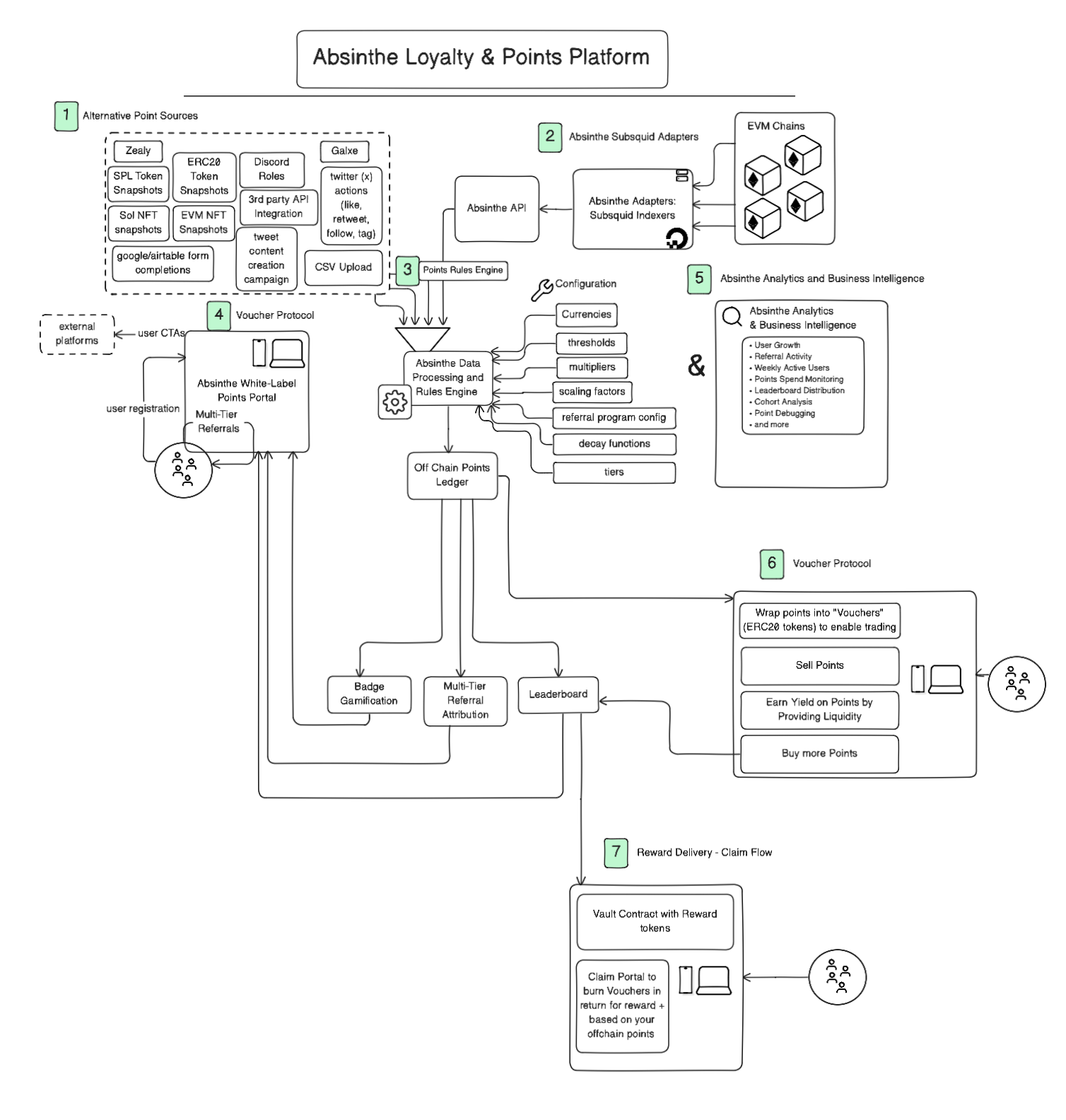 :::tip[What is Absinthe?]
Absinthe is the premier no-code Web3 engagement platform that lets you launch, iterate and scale sophisticated points-based loyalty programs in days, not weeks.
:::
### Why Points Programs?
Points have become the **universal engagement layer** of Web3 - the bridge between attention and value. In a space where users are overloaded with protocols, tokens, and tools, points offer a simple, scalable way to drive behavior, build loyalty, and track participation.
### How Absinthe Works
Absinthe transforms the complex process of building points programs into a simple, streamlined experience through our complete no-code solution.
#### The Universal Engagement Layer
Points are the simplest bridge between attention and value. They turn complex on-chain and off-chain activity into a single, intuitive metric for driving behavior, building loyalty and tracking real user impact.
### What You Can Build
#### 🎯 Flexible Points Programs
* **Diverse Activities**: Reward NFT holding, trading volume, lending/borrowing, liquidity provision, social engagement
* **Multi-Chain Tracking**: Track both on-chain and off-chain actions from blockchain transactions to social media interactions
* **Complex Structures**: Create multi-season campaigns, referral systems, and custom point logic
#### 🎨 Professional Campaign Websites
* **Drag-and-Drop Builder**: Create beautiful campaign sites with no coding required
* **Dynamic Elements**: Leaderboards, referral systems, social feeds, and interactive components
* **Custom Branding**: Use your own domains with full DNS management
#### 📊 Advanced Analytics & Monitoring
* **Real-Time Leaderboards**: Track user rankings and engagement metrics
* **Comprehensive Tracking**: Monitor campaign performance and user behavior
* **User Support Tools**: Easily investigate and resolve user-reported issues with detailed activity logs
* **Error Logging**: Comprehensive error tracking and alerting system to quickly identify and resolve issues
### Quick Start Guide
:::steps
##### Step 1: Set Up Your Campaign
Define your campaign goals and target activities. Absinthe supports:
* On-chain events (transactions, NFT mints, DeFi interactions)
* Social actions (Twitter follows, Discord joins, GitHub stars)
* API data and CSV uploads
##### Step 2: Configure Point Rules
Create sophisticated point logic without code:
* Custom thresholds and multipliers
* Decay functions and time-based rules
* Multi-tier reward structures
* Referral bonus systems
##### Step 3: Build Your Campaign Site
Use our drag-and-drop builder to create:
* Dynamic leaderboards
* Multi-tier referral systems
* Branded campaign pages
* Custom domain integration
##### Step 4: Launch and Monitor
Deploy your campaign and track performance:
* Real-time analytics dashboard
* Fraud detection and anti-Sybil protection
* User engagement metrics
* Revenue impact analysis
:::
### Core Capabilities
:::note[Universal Engagement Layer]
Ingest any activity through our universal engagement layer:
* On-chain events from any blockchain
* Social actions across platforms
* API data from your existing systems
* CSV uploads for historical data
:::
:::info[No-Code Point Rules]
Define custom point logic without programming:
* Thresholds and multipliers
* Decay functions and time-based rules
* Tier systems and bonuses
* Complex reward mechanisms
:::
:::success[Tokenized Rewards]
Transform points into value:
* Wrap earned points into tradable "vouchers" (ERC-20 tokens)
* Enable buying, selling, or providing liquidity
* Deliver real rewards through claim portals
* Burn vouchers for on-chain token redemption
:::
#### 🔗 Multi-Chain Support
* **EVM Chains**: Ethereum, Polygon, BSC, and more
* **Social Platforms**: Twitter, Discord, GitHub, and more
### Proven Results
We've powered **50+ points programs** used by over **1.5+ million users** across the Web3 landscape.
:::code-group
:::tip[What is Absinthe?]
Absinthe is the premier no-code Web3 engagement platform that lets you launch, iterate and scale sophisticated points-based loyalty programs in days, not weeks.
:::
### Why Points Programs?
Points have become the **universal engagement layer** of Web3 - the bridge between attention and value. In a space where users are overloaded with protocols, tokens, and tools, points offer a simple, scalable way to drive behavior, build loyalty, and track participation.
### How Absinthe Works
Absinthe transforms the complex process of building points programs into a simple, streamlined experience through our complete no-code solution.
#### The Universal Engagement Layer
Points are the simplest bridge between attention and value. They turn complex on-chain and off-chain activity into a single, intuitive metric for driving behavior, building loyalty and tracking real user impact.
### What You Can Build
#### 🎯 Flexible Points Programs
* **Diverse Activities**: Reward NFT holding, trading volume, lending/borrowing, liquidity provision, social engagement
* **Multi-Chain Tracking**: Track both on-chain and off-chain actions from blockchain transactions to social media interactions
* **Complex Structures**: Create multi-season campaigns, referral systems, and custom point logic
#### 🎨 Professional Campaign Websites
* **Drag-and-Drop Builder**: Create beautiful campaign sites with no coding required
* **Dynamic Elements**: Leaderboards, referral systems, social feeds, and interactive components
* **Custom Branding**: Use your own domains with full DNS management
#### 📊 Advanced Analytics & Monitoring
* **Real-Time Leaderboards**: Track user rankings and engagement metrics
* **Comprehensive Tracking**: Monitor campaign performance and user behavior
* **User Support Tools**: Easily investigate and resolve user-reported issues with detailed activity logs
* **Error Logging**: Comprehensive error tracking and alerting system to quickly identify and resolve issues
### Quick Start Guide
:::steps
##### Step 1: Set Up Your Campaign
Define your campaign goals and target activities. Absinthe supports:
* On-chain events (transactions, NFT mints, DeFi interactions)
* Social actions (Twitter follows, Discord joins, GitHub stars)
* API data and CSV uploads
##### Step 2: Configure Point Rules
Create sophisticated point logic without code:
* Custom thresholds and multipliers
* Decay functions and time-based rules
* Multi-tier reward structures
* Referral bonus systems
##### Step 3: Build Your Campaign Site
Use our drag-and-drop builder to create:
* Dynamic leaderboards
* Multi-tier referral systems
* Branded campaign pages
* Custom domain integration
##### Step 4: Launch and Monitor
Deploy your campaign and track performance:
* Real-time analytics dashboard
* Fraud detection and anti-Sybil protection
* User engagement metrics
* Revenue impact analysis
:::
### Core Capabilities
:::note[Universal Engagement Layer]
Ingest any activity through our universal engagement layer:
* On-chain events from any blockchain
* Social actions across platforms
* API data from your existing systems
* CSV uploads for historical data
:::
:::info[No-Code Point Rules]
Define custom point logic without programming:
* Thresholds and multipliers
* Decay functions and time-based rules
* Tier systems and bonuses
* Complex reward mechanisms
:::
:::success[Tokenized Rewards]
Transform points into value:
* Wrap earned points into tradable "vouchers" (ERC-20 tokens)
* Enable buying, selling, or providing liquidity
* Deliver real rewards through claim portals
* Burn vouchers for on-chain token redemption
:::
#### 🔗 Multi-Chain Support
* **EVM Chains**: Ethereum, Polygon, BSC, and more
* **Social Platforms**: Twitter, Discord, GitHub, and more
### Proven Results
We've powered **50+ points programs** used by over **1.5+ million users** across the Web3 landscape.
:::code-group
**Aethir**: 800,000+ participants, $36M revenue acceleration
**Neon**: Significant ecosystem growth through multi-season campaigns
:::
### Key Features
#### Sophisticated Point Logic
Get extremely creative with complex points rules, thresholds, and reward mechanisms that adapt to your project's unique needs.
#### Identity Management
Support multiple identity types including wallet addresses (EVM, Solana, Bitcoin), social accounts (Twitter, Discord, GitHub), and email authentication.
:::tip[Turn Activity Into Momentum]
Start building your Web3 engagement layer with Absinthe today. Launch sophisticated points programs that drive real user growth and sustainable engagement.
:::
import { SwaggerComponent } from '../../components/SwaggerComponent'
## Create Earn Event
Send **raw event data** to Absinthe, which will then be processed by your custom business rules to generate points for users.
### Conceptual Overview
:::info
**Raw Data → Rules Engine → Points**
This API is for sending **raw event data**, not points. Absinthe's rules engine processes your raw data through custom business logic to determine the final point awards.
:::
Think of this as a two-step process:
1. **Send Raw Data**: Use this API to report that something happened (e.g., "user killed 5 monsters", "user minted 3 NFTs", "user scored 1,250 points in leaderboard")
2. **Rules Processing**: Absinthe applies your configured business rules to convert this raw data into points (e.g., "5 monsters × 10 points each = 50 points", "3 NFTs × bonus multiplier = 75 points")
#### Example Event Types
* **Gaming**: Monsters killed, levels completed, achievements unlocked
* **DeFi**: Tokens swapped, liquidity provided, transactions completed
* **Social**: Posts created, likes received, referrals made
* **Commerce**: Items purchased, reviews written, loyalty actions
### API Details
:::info
**One-time event registration**
Before you can send event data, you must register that event type in the **API → Events** sidebar of your Absinthe dashboard.
:::
* **Endpoint**: `https://gql3.absinthe.network/api/rest/earn-event`
* **Method**: `POST`
* **Auth**: Authorization header (API key generated per campaign)
* **Payload**: *Raw event data* — **not** processed points
### Authorization
```http [Header]
Authorization: Bearer \
```
### Sending Event Data
```bash [curl]
curl -X POST https://gql3.absinthe.network/api/rest/earn-event \
-H "Authorization: Bearer \" \
-H "Content-Type: application/json" \
-d '{
"account_id": "0x123",
"amount": 15,
"identity_type": "EVM_ADDRESS",
"reg_event_id": "9bb4c38c-c3e9-4d74-a8c4-f617ccd9aa4a"
}'
```
#### Real-world Examples
```bash [Gaming: Monsters Killed]
curl -X POST https://gql3.absinthe.network/api/rest/earn-event \
-H "Authorization: Bearer \" \
-H "Content-Type: application/json" \
-d '{
"account_id": "player123@email.com",
"amount": 25, // 25 monsters killed this session
"identity_type": "EMAIL",
"reg_event_id": "monsters-killed-event-id"
}'
```
```bash [DeFi: Volume Traded]
curl -X POST https://gql3.absinthe.network/api/rest/earn-event \
-H "Authorization: Bearer \" \
-H "Content-Type: application/json" \
-d '{
"account_id": "0xABC123...",
"amount": 1500.50, // $1,500.50 in trading volume
"identity_type": "EVM_ADDRESS",
"reg_event_id": "trading-volume-event-id"
}'
```
### How Rules Convert Data to Points
After you send raw event data, Absinthe processes it through your configured rules:
```
Raw Event: "User killed 15 monsters"
↓
Business Rule: "1 monster = 10 points, with 2x multiplier for 10+ monsters"
↓
Final Points: (15 × 10) × 2 = 300 points awarded
```
```
Raw Event: "User traded $1,500 volume"
↓
Business Rule: "Every $100 volume = 5 points, max 100 points per day"
↓
Final Points: min(1500/100 × 5, 100) = 75 points awarded
```
### Behavior Rules
:::warning
**Append-only event log**
All event data is append-only. There is no API call to subtract, reverse, or delete previously sent events.
:::
:::tip
**Negative amounts are invalid**
If you pass a negative value, the API will not accept the request. Send positive raw values only.
:::
### Identity Types
| Enum value | Description / Example |
| --------------------- | ---------------------------------------------- |
| `EVM_ADDRESS` | `0xB58621209Dc0b0c514E52a6D9A165a16ae95e4f7` |
| `SOLANA_ADDRESS` | `8ZUkk8pTyEAjyHbmBBXdrDNiNZ9D9Gcn5HgqxEjD8aHn` |
| `BTC_ADDRESS` | `1A1zP1eP5QGefi2DMPTfTL5SLmv7DivfNa` |
| `EMAIL` | `user@example.com` |
| `DISCORD_PROVIDER_ID` | Numeric—e.g., `99242147425040394` |
| `X_PROVIDER_ID` | Numeric Twitter ID—e.g., `1517923606637912064` |
| `GITHUB_PROVIDER_ID` | Numeric GitHub ID—e.g., `9912345` |
:::note
`*_PROVIDER_ID` values come from OAuth flows (Auth.js, NextAuth, etc.) and remain stable even if the user changes their username.
:::
### Parameters
| Field | Type | Notes |
| --------------- | ------- | ------------------------------------------------------ |
| `account_id` | string | Target identity (see table above) |
| `identity_type` | enum | One of the identity types |
| `amount` | numeric | Raw event value (monsters killed, volume traded, etc.) |
| `reg_event_id` | uuid | Unique event reference for idempotency |
### Error Handling
All requests return 200 OK. Check the top-level `errors[]` array for GraphQL failures:
```json
{
"data": null,
"errors": [
{
"message": "invalid identity_type",
"extensions": { "code": "validation-failed" }
}
]
}
```
### FAQ
#### What's the difference between event data and points?
**Event data** is raw metrics (15 monsters killed, $500 traded). **Points** are the processed output after your business rules are applied (15 monsters → 150 points via your multipliers).
#### Can I send the same event multiple times?
Yes. Each call logs a new event occurrence. If a user kills 10 monsters, then later kills 5 more, send two separate events with `amount: 10` and `amount: 5`.
#### How do I set up the business rules?
Configure your rules in the Absinthe dashboard under **Rules Engine**. Define how raw event values should be converted to points, including multipliers, caps, and conditions.
#### Why separate raw data from points calculation?
This architecture lets you change your point economics without losing historical data. You can adjust multipliers, add seasonal bonuses, or implement complex rules while preserving the original event log.
## Get Leaderboard
Retrieve the **public leaderboard** for a campaign, using **privacy-safe** user display rules.
### API Details
* **Endpoint**: `GET /leaderboard`
* **Auth**: None (public)
* **Caching**: Responses are cached for \~1 minute
#### Query parameters
| Parameter | Type | Required | Default | Description |
| ------------- | ------ | -------- | ------- | ---------------------------------------- |
| `campaign_id` | string | Yes | - | Campaign/season id (format: `xxxx-xxxx`) |
| `limit` | number | No | 100 | Max entries to return (1–1000) |
### Privacy-safe display rules
The leaderboard **never** returns or displays:
* Email addresses
* Wallet addresses
* Secret identifiers
Instead it returns:
* `display_name`: resolved by priority (first match wins)
* User-set name (`users.name`) **only if** it contains **no** bad-word substring (case-insensitive)
* Twitter username (if linked)
* Deterministic anonymous name (seeded by a secret user identifier)
* `avatar_url`:
* Twitter avatar via `https://unavatar.io/x/`
* Otherwise Dicebear via `https://api.dicebear.com/9.x/lorelei/svg?seed=`
### Example request
```bash
curl -X GET "/leaderboard?campaign_id=nhdv-0tkk&limit=100"
```
### Example response
```json
{
"campaign_id": "nhdv-0tkk",
"cached_at": "2025-01-01T00:00:00.000Z",
"currency_names": { "xp": "XP", "gems": "Gems", "gold": "Gold" },
"entries": [
{
"rank": 1,
"user_id": "be9af004-2310-4acf-a2c5-77be909ef560",
"display_name": "Cool Tiger",
"avatar_url": "https://api.dicebear.com/9.x/lorelei/svg?seed=secret-1",
"identities": { "x_username": "elonmusk" },
"scores": {
"xp": { "score": 125, "referral_score": 0, "total": 125 },
"gems": { "score": 0, "referral_score": 0, "total": 0 },
"gold": { "score": 0, "referral_score": 0, "total": 0 }
}
}
]
}
```
## Get User Scores
Retrieve a **single user’s** rank and scores.
### API Details
* **Endpoint**: `GET /users/{user_id}/scores`
* **Auth**:
* **Bearer JWT** (portal user): only allowed when `{user_id}` matches the authenticated user
* **X-API-Key**: allowed (campaign is inferred from the user)
* **Caching**: Responses are cached for \~1 minute
### Example request (user JWT)
```bash
curl -X GET "/users//scores" \
-H "Authorization: Bearer "
```
### Example response
```json
{
"user_id": "be9af004-2310-4acf-a2c5-77be909ef560",
"rank": 42,
"cached_at": "2025-01-01T00:00:00.000Z",
"display_name": "Cool Tiger",
"avatar_url": "https://unavatar.io/x/elonmusk",
"identities": { "x_username": "elonmusk" },
"currency_names": { "xp": "XP", "gems": "Gems", "gold": "Gold" },
"scores": {
"xp": { "score": 900, "referral_score": 100, "total": 1000 },
"gems": { "score": 450, "referral_score": 50, "total": 500 },
"gold": { "score": 225, "referral_score": 25, "total": 250 }
}
}
```
## Actions
:::warning[First-Class Citizens]
Actions are first-class. They may be **priceable** or **non-priceable**.
:::
### Action Types
* **🔢 Priceable:** Must include `amount.asset` and `amount.amount`
* **📊 Non-priceable:** Omitted from pricing but still exported for "it happened" analytics
### Special Handling
**Swaps:** Emit two actions (one per leg) under the same `id`.
The enrichment step dedupes by `id` and keeps the first leg that successfully prices.
### Usage in Adapters
Actions represent instantaneous events in your protocol. Here's how to emit them:
```typescript
// Priceable action (will be priced)
emit('action', {
id: 'swap-123',
user: userAddress,
amount: {
asset: '0xA0b86a33E6441e88C5F2712C3E9b74F5b8E4E0c4', // USDC
amount: '1000000' // 1 USDC
},
type: 'swap'
});
// Non-priceable action (analytics only)
emit('action', {
id: 'claim-456',
user: userAddress,
type: 'claim'
});
```
### Action Lifecycle
1. **Emission** - Adapter emits action with required fields
2. **Validation** - Engine validates action structure
3. **Pricing** - Priceable actions get USD valuations
4. **Deduplication** - Same `id` actions are deduped
5. **Export** - Actions written to configured sinks
## Config File Reference
:::tip[Configuration Guide]
This document describes every field available in the indexer config file (`.absinthe.json`) and how it works. Use this as your comprehensive reference for configuring adapters.
:::
### Top-Level Fields
#### `kind`
* **Type:** `"evm"` (string literal)
* **Purpose:** Determines the chain architecture. Currently only `"evm"` is supported.
* **Example:** `"evm"`
#### `indexerId`
* **Type:** `string`
* **Purpose:** A unique ID used to namespace Redis keys and sink outputs.
* **Example:** `"univ2-indexer"`
#### `flushMs`
* **Type:** `number` (milliseconds)
* **Purpose:** The time window size for Time-Weighted Balance (TWB) calculations.
* **Constraints:** Must be at least `3600000` (1 hour).
* **Example:** `259200000` (3 days)
#### `redisUrl`
* **Type:** `string` (URL)
* **Purpose:** Connection string for Redis.
* **Must start with:** `redis://` or `rediss://`
* **Example:** `"redis://localhost:6379"`
### Network Configuration (`network`)
:::info[EVM Networks Only]
Required when `kind: "evm"`. Defines the blockchain network to index.
:::
| Field | Type | Description | Example |
| ------------ | -------- | -------------------------------------------- | ------------------------------------------------------- |
| `chainId` | `number` | EVM chain ID (validated) | `43111` |
| `gatewayUrl` | `string` | Subsquid archive gateway URL | `"https://v2.archive.subsquid.io/network/hemi-mainnet"` |
| `rpcUrl` | `string` | RPC endpoint used for live calls | `"https://rpc.hemi.network/rpc"` |
| `finality` | `number` | Optional confirmations before block is final | `75` (default if omitted) |
### Block Range (`range`)
:::warning[Indexing Scope]
Defines which block range to index. Start small for testing, then expand for production.
:::
| Field | Type | Description | Example |
| ----------- | -------- | ---------------------------------- | --------- |
| `fromBlock` | `number` | Starting block (inclusive) | `1451314` |
| `toBlock` | `number` | Ending block (inclusive, optional) | `2481775` |
### Pricing Range (`pricingRange`)
:::success[Pricing Control]
Defines when to start pricing assets. Useful if historical pricing data is only available after a certain block or timestamp.
:::
#### Block-based Configuration
```json [Block-Based]
{
"type": "block",
"fromBlock": 30000000
}
```
#### Timestamp-based Configuration
```json [Timestamp-Based]
{
"type": "timestamp",
"fromTimestamp": 1700000000000
}
```
### Sink Configuration (`sinkConfig`)
:::tip[Output Destinations]
Specifies where to output enriched data. You can configure one or multiple sinks for flexibility.
:::
#### Supported Sink Types
##### 📤 **stdout**
```json [Console Output]
{ "sinkType": "stdout", "json": false }
```
Prints output to console (JSON if `json: true`).
##### 📊 **csv**
```json [CSV Export]
{ "sinkType": "csv", "path": "output.csv" }
```
Writes rows to a CSV file.
##### 🌐 **absinthe**
:::info[Coming Soon]
Support for Absinthe API sink is coming soon.
:::
#### Multiple Sinks Example
```json [Multiple Outputs]
{
"sinks": [
{ "sinkType": "stdout" },
{ "sinkType": "csv", "path": "univ2swaps.csv" }
]
}
```
### Adapter Configuration (`adapterConfig`)
:::info[Adapter Selection]
Defines which adapter to run and what parameters to pass to it. Each adapter has its own configuration requirements.
:::
| Field | Type | Description |
| ----------- | -------- | --------------------------------- |
| `adapterId` | `string` | Adapter name (must be registered) |
| `params` | `object` | Adapter-specific parameters |
#### Example Configuration
```json [Adapter Setup]
{
"adapterId": "uniswap-v2",
"params": {
"poolAddress": "0x0621bae969de9c153835680f158f481424c0720a",
"trackSwaps": true
}
}
```
### Asset Feed Configuration (`assetFeedConfig`)
:::warning[Critical Configuration]
Controls how each asset is priced. This is an array of match rules. Each rule defines how to price specific assets.
:::
#### Understanding Match Rules
Each rule contains:
* **`match`**: Which assets it applies to (by key or labels)
* **`config`**: How to price those assets
#### Match Criteria
##### 🔑 **By Asset Key**
```json [Exact Match]
"match": { "key": "0xAA40c0c7644e0b2B224509571e10ad20d9C4ef28" }
```
##### 🏷️ **By Labels**
```json [Label Matching]
"match": {
"matchLabels": {
"protocol": "uniswap",
"version": "v2"
}
}
```
##### 🔍 **Advanced Expressions**
```json [Complex Matching]
"match": {
"matchExpressions": [
{
"key": "chain",
"operator": "In",
"values": ["ethereum", "polygon"]
}
]
}
```
#### Asset Configuration
| Field | Type | Description |
| ----------- | ------------------------------ | ----------------------- |
| `assetType` | `"erc20" \| "erc721" \| "spl"` | Asset type |
| `priceFeed` | `FeedSelector` | How to price this asset |
#### Price Feed Types
:::code-group
```json [Coingecko Feed]
{
"kind": "coingecko",
"id": "bitcoin"
}
```
```json [Pegged Feed]
{
"kind": "pegged",
"usdPegValue": 1
}
```
```json [Uniswap V2 NAV]
{
"kind": "univ2nav",
"token0": {
"kind": "coingecko",
"id": "ethereum"
},
"token1": {
"kind": "pegged",
"usdPegValue": 1
}
}
```
:::
#### Complete Asset Configuration Example
```json [Asset Feed Example]
{
"match": {
"key": "0xad11a8BEb98bbf61dbb1aa0F6d6F2ECD87b35afA"
},
"config": {
"assetType": "erc20",
"priceFeed": {
"kind": "pegged",
"usdPegValue": 1
}
}
}
```
## Core Concepts
:::tip[Foundation]
Understanding these core concepts will help you build effective adapters and work with the engine flow.
:::
### 📊 Assets, Labels, Metrics
| Concept | Description | Storage |
| ----------- | -------------------------------------- | ------------- |
| **Asset** | A trackable thing (ERC20, ERC721, SPL) | Configuration |
| **Labels** | Immutable metadata on an asset | Redis |
| **Metrics** | Mutable values over time for an asset | Redis |
### 🎯 Events
Adapters emit events to describe what happened:
| Event | Purpose | Trigger |
| ------------------------ | ------------------------------------------------------- | --------------- |
| **BalanceDelta** | Change in holdings for a user and asset | Balance changes |
| **MeasureDelta** | Change in a metric value for an asset | Metric updates |
| **PositionUpdate** | Force a new TWB row without balance change | Manual trigger |
| **PositionStatusChange** | Mark a position active or inactive | Status changes |
| **Reprice** | Trigger repricing for an asset at specific time | Price updates |
| **Action** | Instantaneous event (swap, mint, bridge, claim, custom) | Protocol events |
### 📚 Deep Dives
For detailed information on specific concepts:
* **[Actions →](/adapters/actions)** - Learn about priceable/non-priceable actions and their lifecycle
* **[Time-Weighted Balances →](/adapters/time-weighted-balances)** - Understand TWB calculations and the engine flow
## Deploy Prebuilt Adapters on Railway
**Total time: \~20-30 minutes** (assuming you have accounts set up)
:::info[Who is this for?]
This guide is for **clean fork deployments** — your protocol works like Uniswap V2/V3, Morpho, or standard ERC20 tokens. No code changes needed.
If you need to modify adapter code, see [Build Your Own Adapter](/adapters/build-your-own) instead.
:::
***
### Time Breakdown
| Phase | Time | What You'll Do |
| --------------------- | -------- | -------------------------------------- |
| 1. Gather Credentials | \~10 min | Get API keys and RPC URL |
| 2. Generate Config | \~5 min | Fill form, select trackables, generate |
| 3. Deploy on Railway | \~5 min | Set env vars, click deploy |
| 4. Verify | \~5 min | Check logs and dashboard |
***
### Why Railway?
Railway is the recommended deployment platform for Absinthe adapters because:
* **One-Click Deployment**: Use pre-configured templates for instant setup
* **Automatic Scaling**: Railway handles infrastructure automatically
* **Easy Environment Variables**: Simple UI for managing secrets
* **Built-in Logging**: Monitor your adapter in real-time
* **Cost-Effective**: Pay only for what you use
* **No DevOps Required**: Focus on your adapter config, not infrastructure
***
### Phase 1: Gather Credentials (\~10 min)
Before you start, collect these four items. If you already have them, skip to Phase 2.
#### 1.1 Absinthe API Key (\~2 min)
⚠️ **IMPORTANT**: Get your API key from the CMO request query that has been shared with you.
The API key will be provided in the integration brief link shared by your CMO. This link contains all the necessary campaign context and API credentials.
If you need to access it directly:
1. Visit [app.absinthe.network](https://app.absinthe.network/) and log in
2. Go to your organization → **Campaigns**
3. Select your campaign → **API Key Access**
4. Copy your API key
#### 1.2 RPC URL (\~3 min)
You need an RPC endpoint for your blockchain. Sign up for one if you don't have it:
| Chain | Providers |
| -------- | -------------------------------------------------------------------------------------------------- |
| Ethereum | [Alchemy](https://alchemy.com/), [Infura](https://infura.io/), [QuickNode](https://quicknode.com/) |
| Base | [Alchemy](https://alchemy.com/), [QuickNode](https://quicknode.com/) |
| Arbitrum | [Alchemy](https://alchemy.com/), [Infura](https://infura.io/) |
| Polygon | [Alchemy](https://alchemy.com/), [Infura](https://infura.io/) |
Your RPC URL will look like:
```
https://eth-mainnet.g.alchemy.com/v2/YOUR_API_KEY
```
#### 1.3 CoinGecko API Key (\~3 min)
Required for price feed functionality:
1. Go to [coingecko.com/api/pricing](https://www.coingecko.com/api/pricing)
2. Sign up for a Pro account
3. Copy your API key
#### 1.4 Railway Account (\~2 min)
1. Sign up at [railway.app](https://railway.app/)
2. Connect your GitHub account (optional but recommended)
***
**Checkpoint:** You should now have:
* [ ] Absinthe API Key
* [ ] RPC URL
* [ ] CoinGecko API Key
* [ ] Railway account
***
### Phase 2: Generate Config (\~5 min)
#### 2.1 Open the Config Generator
Go to: [**Config Generator**](https://auto-adapter-forge.vercel.app/)
:::tip[Pre-filled link?]
If your CMO shared a pre-filled link, the adapter type, chain, and contract address will already be set. Just verify and continue.
:::
#### 2.2 Select Your Adapter Type
Choose the adapter that matches your protocol:
| Adapter | Use For |
| ------------------ | -------------------------------------------------- |
| **ERC20 Holdings** | Track token balances |
| **Uniswap V2** | AMM with fungible LP tokens (swaps + LP positions) |
| **Uniswap V3** | AMM with NFT positions (swaps) |
#### 2.3 Fill in the Required Fields
* **Contract/Pool address**: Your protocol's main contract
* **Chain**: Select the blockchain
* **From Block**: Auto-detected for most chains, or enter manually
#### 2.4 Select Trackables
After filling in the required fields, you'll be prompted to select which activities you want to track:
**Available trackables by adapter:**
* **ERC20 Holdings**: Token Holdings
* **Uniswap V2**: Swap Trackable, LP Trackable
* **Uniswap V3**: Swap Trackable
Select the trackables you want to monitor. All trackables are selected by default, but you can uncheck any you don't need.
#### 2.5 Generate the Configuration
Click **"Generate Config"** → Copy the `INDEXER_CONFIG` (base64 encoded)
:::tip[Deployment guide available]
After generating your config, the Config Generator will show a deployment guide with step-by-step instructions for deploying on Railway. You can follow that guide directly, or continue with Phase 3 below for the same instructions.
:::
***
**Checkpoint:** You should now have:
* [ ] `INDEXER_CONFIG` value copied
***
### Phase 3: Deploy on Railway (\~5 min)
:::info[Already following the Config Generator guide?]
If you're following the deployment guide shown on the Config Generator page after generating your config, you can skip this section. The instructions below are the same as what's shown there.
:::
#### 3.1 Open Railway Template
Click: [**Railway Template**](https://railway.com/new/template/zonal-gentleness)

#### 3.2 Set Environment Variables
Add these **four required** environment variables:
| Variable | Value | Where You Got It |
| ------------------- | -------------------------- | ---------------------------- |
| `INDEXER_CONFIG` | (paste your base64 config) | Config Generator (Phase 2) |
| `RPC_URL` | (your RPC endpoint) | Alchemy/Infura (Phase 1) |
| `ABSINTHE_API_KEY` | (your API key) | Absinthe Dashboard (Phase 1) |
| `COINGECKO_API_KEY` | (your CoinGecko key) | CoinGecko (Phase 1) |
#### 3.3 Deploy
Click **"Deploy"** in Railway.
Railway will:
1. Build a Docker container (\~2-3 min)
2. Inject your environment variables
3. Start the adapter
***
**Checkpoint:** Deployment started. Proceed to Phase 4.
***
### Phase 4: Verify (\~5 min)
#### 4.1 Check Railway Logs
1. Go to your project in Railway
2. Click on the deployment
3. View logs
**Look for these success messages:**
* ✅ "Indexer started"
* ✅ "Processing block X"
* ✅ "Connected to RPC"

#### 4.2 Monitor Indexer Status
Once you see the indexer running successfully in Railway logs, monitor it for **2-5 minutes** to ensure it's processing blocks without errors.
**Once verified:**
* ✅ Indexer is running green (no errors in logs)
* ✅ Processing blocks continuously
* ✅ Connected to RPC successfully
You can now **inform your CMO** to check the adapter directly in the app-dashboard. The CMO will verify that events are being received and the adapter is visible in the campaign.
#### 4.3 Initial Sync
:::info[Sync time varies]
Initial sync depends on your `fromBlock` setting. A large block range may take hours. Check Railway logs for progress.
:::
***
**Checkpoint:** You should see:
* [ ] Railway logs show "Indexer started"
* [ ] No errors in logs
* [ ] Indexer running green for 2-5 minutes
* [ ] CMO notified to verify in app-dashboard
***
### You're Done!
Your adapter is now:
* Monitoring new blocks in real-time
* Processing events as they occur
* Sending data to Absinthe continuously
**Next step:** Once you've verified the indexer is running green for 2-5 minutes, inform your CMO to check the adapter in the app-dashboard. The CMO will handle the final verification and point distribution configuration.
***
### Troubleshooting
If something went wrong, find your symptom below.
#### Quick Diagnosis
| Symptom | Likely Cause | Fix Time |
| ----------------------- | ---------------------- | ------------------- |
| Adapter not starting | Missing env vars | \~2 min |
| "Invalid API Key" error | Wrong API key source | \~2 min |
| "RPC Connection Failed" | Bad RPC URL | \~5 min |
| "Contract Not Found" | Wrong address or chain | \~2 min |
| No data in Absinthe | Adapter not synced yet | Wait 5-10 min |
| Slow sync | Large block range | Wait (can be hours) |
***
#### "Invalid API Key" Error (\~2 min fix)
**Cause:** Using wrong API key
**Fix:**
1. Check the CMO request query link that was shared with you for the correct API key
2. If needed, go to [app.absinthe.network](https://app.absinthe.network/)
3. Navigate to your campaign → **API Key Access**
4. Copy the API key
5. Update `ABSINTHE_API_KEY` in Railway
6. Redeploy
:::warning
Don't use API keys from `.env` files or example configs. Always use the key from the CMO request query or get it from the dashboard.
:::
***
#### "RPC Connection Failed" (\~5 min fix)
**Cause:** Invalid or expired RPC URL
**Fix:**
1. Verify your RPC URL includes your provider's API key
2. Check your RPC provider account is active (not rate-limited)
3. Test the RPC URL in your browser or with `curl`
4. Try a different provider if needed
**Test your RPC:**
```bash
curl -X POST YOUR_RPC_URL \
-H "Content-Type: application/json" \
-d '{"jsonrpc":"2.0","method":"eth_blockNumber","params":[],"id":1}'
```
***
#### "Contract Not Found" (\~2 min fix)
**Cause:** Wrong contract address or chain mismatch
**Fix:**
1. Verify the contract address is correct (check on block explorer)
2. Ensure you selected the correct chain in the config generator
3. Confirm the contract exists on that chain
***
#### "fromBlock Not Found" (\~2 min fix)
**Cause:** Chain doesn't support automatic block lookup
**Fix:**
1. Find the contract creation block on a block explorer (e.g., Etherscan)
2. Re-generate config with manual `fromBlock` value
3. Update `INDEXER_CONFIG` in Railway
4. Redeploy
***
#### Adapter Crashes After Deploy (\~5-10 min fix)
**Cause:** Various — check logs for specifics
**Fix:**
1. Go to Railway → your deployment → **Logs**
2. Look for the specific error message
3. Common fixes:
* Missing env var → Add it and redeploy
* Invalid config → Re-generate config
* RPC rate limit → Upgrade RPC plan or use different provider
***
### Quick Reference
#### Environment Variables Checklist
```bash
# All four are required
INDEXER_CONFIG= # From config generator
RPC_URL= # From Alchemy/Infura/QuickNode
ABSINTHE_API_KEY= # From app.absinthe.network
COINGECKO_API_KEY= # From coingecko.com
```
#### Useful Links
| Resource | Link |
| ------------------ | ---------------------------------------------------------------------------------------------- |
| Config Generator | [auto-adapter-forge.vercel.app](https://auto-adapter-forge.vercel.app/) |
| Railway Template | [railway.com/new/template/zonal-gentleness](https://railway.com/new/template/zonal-gentleness) |
| Absinthe Dashboard | [app.absinthe.network](https://app.absinthe.network/) |
| CoinGecko API | [coingecko.com/api/pricing](https://coingecko.com/api/pricing) |
***
### Summary
| Phase | Time | Status |
| --------------------- | --------------- | ------ |
| 1. Gather Credentials | \~10 min | ☐ |
| 2. Generate Config | \~5 min | ☐ |
| 3. Deploy on Railway | \~5 min | ☐ |
| 4. Verify | \~5 min | ☐ |
| **Total** | **\~20-30 min** | |
Once verified, return to the Absinthe App to configure point distribution rules.
***
## Overview
:::tip[Activity Indexer]
An activity indexer for web3 that turns on-chain activity into time-weighted balances and point-in-time actions.
:::
### What this is
An activity indexer for web3 that turns on-chain activity into:
| Activity Type | Purpose | Example Use Case |
| -------------------------------- | --------------------------- | -------------------- |
| **Time-weighted balances (TWB)** | "held over time" metrics | LP position duration |
| **Point-in-time actions** | "happened at time T" events | Swap transactions |
:::info[Architecture Overview]
**Inputs:**
* JSON config file
* Your adapter logic
**Runtime:**
* Subsquid for block, log, and tx access
* Redis for state
**Outputs:**
* Your chosen sinks (stdout, CSV, etc.)
* Pricing is optional and pluggable
:::
### Why it exists
:::warning[Avoid Reinventing the Wheel]
You should not re-solve ingestion, pricing, and windowing every time you add a new protocol integration.
:::
> **Focus on what matters:** Adapters focus on mapping protocol semantics to a unified model. The engine handles state, time windows, pricing, and export.
## Quickstart 🚀
### Quick Start
Get the demo running end-to-end in minutes.
#### 1) Install dependencies
```bash
pnpm i
```
#### 2) Set up environment
Copy the example environment file:
```bash
cp .env.example .env
```
Make sure to fill in any required values inside `.env` (e.g. RPC URLs or API keys if used).
#### 3) Start Redis
Run Redis locally (choose Docker or Podman):
```bash
# Using Docker
docker run -d -p 6379:6379 redis/redis-stack:latest
# Using Podman
podman run -d -p 6379:6379 redis/redis-stack:latest
```
#### 4) Start the demo indexer
Run the included Uniswap V2 demo adapter:
```bash
pnpm start adapters/uniswap-v2/tests/config/uniswap-v2.absinthe.json
```
***
**Result:**
You'll see Uniswap V2 swap events streaming to a CSV file with live USD pricing.
This confirms your environment is working end-to-end.
## Time-Weighted Balances & Engine Flow
:::tip[Core Concept]
Time-weighted balances track asset holdings over time, enabling sophisticated metrics like "average balance held for 30 days" or "LP position duration."
:::
### Overview
Time-weighted balances (TWB) represent the average value of a position over a target period by combining:
#### 📊 Core Components
* **🔄 Balance windows** — Every time the balance changes, a new window is emitted
* **📈 TWAP (Time-Weighted Average Price)** — Price is averaged separately per window duration
* **💰 Balance × TWAP** — Each window holds a distinct balance multiplied by its TWAP
:::info[Why This Matters]
This approach enables precise metrics like:
* Average balance held over periods
* LP position duration tracking
* Accurate value-weighted calculations
:::
### Engine Flow
```bash [Flow Diagram]
Adapter -> emit(...) -> Engine.ingest(...) -> Redis state
-> periodic flush to windows (TWB)
-> price backfill per window boundary
-> enrichment (runner info, base fields, prices, dedupe)
-> sinks (stdout, csv, ...)
```
### Key Stages
:::steps
##### 📥 Ingest
The engine normalizes Subsquid logs and transactions into a common context with `ts`, `height`, `txHash`, and `logIndex`.
##### 🪟 Windows
Each balance change emits a new window.
Windows are closed either by a balance delta or by a periodic flush.
A window is `[startTs, endTs]` with a fixed balance.
##### 💰 Pricing
Each window is priced independently using TWAP over its duration:
| Feed Handler | Purpose |
| ------------ | -------------------- |
| `coingecko` | Market prices |
| `pegged` | Stablecoin pegs |
| `univ2nav` | Uniswap V2 liquidity |
| `ichinav` | Ichi liquidity |
| `univ3lp` | Uniswap V3 positions |
##### 🎨 Enrichment
Adds runner metadata, dedupes actions by `id`, filters invalid items, and prepares rows for export.
:::
### TWB Calculation
Time-weighted balances are calculated by:
:::warning[Four-Step Process]
1. **🔄 Window Creation** — Each balance change emits a new window
2. **📊 TWAP Pricing** — Average price for that window's time span
3. **💰 Balance × TWAP** — Compute value for each window
4. **📈 Aggregation** — Weight each window by duration and sum across the period
:::
#### Correct Example (with 2 windows)
```typescript
// User holds 100 USDC for 1 hour, then 200 USDC for 2 hours
// Price of USDC = $1.00 throughout (TWAP = 1 for both windows)
// Window 1: [0h-1h] => balance = 100, TWAP = 1 → 100 * 1 = 100
// Window 2: [1h-3h] => balance = 200, TWAP = 1 → 200 * 1 = 200
```
:::success[Key Clarifications]
* **Two windows are emitted** (one for \[0–1h], one for \[1–3h])
* **We never collapse** multiple balance states into one averaged window
* **Each window is priced and weighted separately**, then aggregated
:::
## 1. Overview & Schema
### Purpose
This adapter indexes Uniswap V2 pool activity. It tracks:
* **LP token balance changes** (`Transfer` events)
* **Swaps** (`Swap` events)
The adapter provides a foundation for building DeFi analytics, yield farming rewards, and trading activity tracking.
### Core Structure
```ts
export default registerAdapter({
name: 'uniswap-v2',
semver: '0.0.1',
schema: z.object({
poolAddress: ZodEvmAddress,
trackSwaps: z.boolean().optional(),
trackLP: z.boolean().optional(),
}).refine((p) => !!p.trackSwaps || !!p.trackLP),
build: ({ params }) => { ... }
})
```
### Key Components
#### `registerAdapter`
**What it does:** Registers this adapter with the Absinthe framework.
**Why it matters:** This makes the adapter discoverable and configurable through the standard Absinthe interface.
#### `schema` Validation
**Purpose:** Validates user-supplied configuration parameters.
**Key requirements:**
* `poolAddress`: Must be a valid EVM address (the Uniswap V2 pool contract)
* `trackSwaps` or `trackLP`: At least one tracking mode must be enabled
* Uses Zod for runtime type validation
**Example configuration:**
```json
{
"poolAddress": "0x1234567890123456789012345678901234567890",
"trackSwaps": true,
"trackLP": true
}
```
#### `build` Function
**What it defines:**
* Which blockchain logs to listen for
* How to process those logs when they occur
* Event emission logic for downstream processing
**Key principle:** The `build` function returns a processor configuration that tells the system exactly what data to collect and how to transform it.
### What You'll Learn
This tutorial will walk you through:
1. **How to configure log filtering** for optimal performance
2. **Redis caching strategies** to minimize RPC calls
3. **LP position tracking** via Transfer events
4. **Swap event processing** for trade analytics
5. **Best practices** for building robust DeFi adapters
## 2. buildProcessor
### Purpose
The `buildProcessor` function configures Subsquid to fetch only the logs we care about. This is crucial for performance - we want to minimize the amount of data we're processing while ensuring we capture all relevant events.
### Implementation
```ts
buildProcessor: (base) =>
base.addLog({
address: [params.poolAddress],
topic0: [transferTopic, swapTopic],
}),
```
### How It Works
#### Log Filtering Strategy
**Address Filtering:**
* `address: [params.poolAddress]` - Only listen to events from our specific Uniswap V2 pool
* This dramatically reduces noise from other contracts on the blockchain
**Topic Filtering:**
* `topic0: [transferTopic, swapTopic]` - Only capture Transfer and Swap events
* `topic0` is the first topic in Ethereum event logs (the event signature)
#### Event Topics
```ts
// ERC-20 Transfer event signature
const transferTopic = '0xddf252ad1be2c89b69c2b068fc378daa952ba7f163c4a11628f55a4df523b3ef';
// Uniswap V2 Swap event signature
const swapTopic = '0xd78ad95fa46c994b6551d0da85fc275fe613ce37657fb8d5e3d130840159d822e';
```
### Performance Benefits
#### Why This Matters
1. **Reduced Data Volume:** Only process events from the specific pool we're tracking
2. **Faster Processing:** Less data means faster indexing and lower costs
3. **Network Efficiency:** Minimize RPC calls and bandwidth usage
#### Real-World Impact
For a busy Uniswap V2 pool:
* **Without filtering:** Could process thousands of irrelevant events per block
* **With filtering:** Only processes events from that specific pool contract
### Best Practices
#### Address Filtering
```ts
// ✅ Good: Exact pool address
address: ['0x1234567890123456789012345678901234567890']
// ❌ Bad: No filtering (processes all contracts)
address: undefined
// ❌ Bad: Too broad (multiple unrelated pools)
address: ['0x123...', '0x456...', '0x789...']
```
#### Topic Filtering
```ts
// ✅ Good: Only relevant events
topic0: [transferTopic, swapTopic]
// ❌ Bad: All events (massive overhead)
topic0: undefined
// ❌ Bad: Unnecessary events
topic0: [transferTopic, swapTopic, mintTopic, burnTopic]
```
### Configuration Tips
#### Single Pool vs Multiple Pools
**Single Pool (Recommended):**
```ts
buildProcessor: (base) =>
base.addLog({
address: [params.poolAddress],
topic0: [transferTopic, swapTopic],
}),
```
**Multiple Pools (Advanced):**
```ts
buildProcessor: (base) =>
base.addLog({
address: params.poolAddresses, // Array of pool addresses
topic0: [transferTopic, swapTopic],
}),
```
:::warning[Performance Consideration]
When tracking multiple pools, consider the trade-off between data completeness and processing overhead. Start with single pools for better performance.
:::
## 3. Redis Token Caching
### Purpose
Before we can decode swap events, we need to know which tokens are in the pool. Uniswap V2 pools have `token0` and `token1` addresses that we need to fetch from the contract. To avoid expensive RPC calls on every swap, we cache these addresses in Redis.
### Implementation
```ts
const token0Key = `univ2:${params.poolAddress}:token0`;
const token1Key = `univ2:${params.poolAddress}:token1`;
let tk0Addr = await redis.get(token0Key);
let tk1Addr = await redis.get(token1Key);
if (!tk0Addr || !tk1Addr) {
const poolContract = new univ2Abi.Contract(rpc, params.poolAddress);
tk0Addr = (await poolContract.token0()).toLowerCase();
tk1Addr = (await poolContract.token1()).toLowerCase();
await redis.set(token0Key, tk0Addr);
await redis.set(token1Key, tk1Addr);
}
```
### Why This Matters
#### The Problem
Without caching, every swap event would require:
1. **RPC Call to get `token0`** (\~$0.0001-0.001 per call)
2. **RPC Call to get `token1`** (\~$0.0001-0.001 per call)
3. **For 1000 swaps:** \~$0.20-2.00 in RPC costs
#### The Solution
With Redis caching:
1. **First event:** Fetch from contract and cache (\~$0.0002)
2. **All subsequent events:** Read from Redis (\~$0.000001)
3. **For 1000 swaps:** \~$0.001 + negligible Redis costs
### Cache Key Strategy
#### Naming Convention
```ts
const token0Key = `univ2:${params.poolAddress}:token0`;
const token1Key = `univ2:${params.poolAddress}:token1`;
```
**Why this format?**
* `univ2:` - Namespacing to avoid collisions
* `${poolAddress}:` - Pool-specific data
* `:token0`/`:token1` - Clear field identification
#### Collision Prevention
**Automatic Config Prefixing:**
All Redis keys are automatically prefixed with a hash of your adapter configuration, ensuring that different adapters or different configurations cannot collide with each other.
```ts
// Your actual Redis key structure:
// [configHash]:univ2:0x123...:token0
// [configHash]:univ3:0x456...:token0
```
**Protocol Namespacing (Recommended):**
While not mandatory due to automatic config prefixing, adding protocol prefixes like `univ2:` is highly recommended for easier debugging and key organization.
```ts
// ✅ Recommended: Clear protocol namespacing
`univ2:${params.poolAddress}:token0`
`univ3:${params.poolAddress}:token0` // Different protocol
// ⚠️ Possible but less clear: Protocol prefix not required
`${params.poolAddress}:token0` // Still collision-safe due to config hash
```
**Why protocol prefixes help:**
* **Debugging:** Easier to identify which adapter/protocol owns the data
* **Maintenance:** Clear separation between different protocols
* **Readability:** Self-documenting keys in Redis
### Address Normalization
#### Why Lowercase?
```ts
tk0Addr = (await poolContract.token0()).toLowerCase();
tk1Addr = (await poolContract.token1()).toLowerCase();
```
**Consistency Benefits:**
* Ethereum addresses are case-insensitive but case-significant for checksums
* Lowercase ensures consistent storage and comparison
* Prevents duplicate cache entries for the same address
**Example:**
```ts
// These are the same address but different strings:
'0x742d35Cc6634C0532925a3b8F6f5c6fF1c4a5F1' // Mixed case
'0x742d35cc6634c0532925a3b8f6f5c6ff1c4a5f1' // Lowercase
```
### Error Handling
#### Network Failures
```ts
try {
const poolContract = new univ2Abi.Contract(rpc, params.poolAddress);
tk0Addr = (await poolContract.token0()).toLowerCase();
} catch (error) {
console.error(`Failed to fetch token0 for pool ${params.poolAddress}:`, error);
throw error; // Re-throw to fail the adapter
}
```
### Best Practices
#### Cache Key Patterns
```ts
// Pool metadata
`univ2:${pool}:token0`
`univ2:${pool}:token1`
`univ2:${pool}:fee` // Could cache fee tier too
// User data (if needed)
`univ2:${pool}:${user}:balance`
// Global data
`univ2:factory` // Factory contract address
```
#### Monitoring Cache Hit Rates
```ts
// Log cache performance
if (tk0Addr && tk1Addr) {
console.log(`Cache hit for pool ${params.poolAddress}`);
} else {
console.log(`Cache miss for pool ${params.poolAddress}`);
}
```
## 4. LP Tracking
### Purpose
Track user LP token balances via `Transfer` events. This emits `balanceDelta` events that feed into the time-weighted balance (TWB) calculation system, enabling rewards based on liquidity provision duration.
### Implementation
```ts
if (params.trackLP && log.topics[0] === transferTopic) {
const { from, to, value } = univ2Abi.events.Transfer.decode(log);
// Handle token outflow (decrease balance)
await emit.balanceDelta({
user: from,
asset: params.poolAddress,
amount: new Big(value.toString()).neg(),
activity: 'hold',
});
// Handle token inflow (increase balance)
await emit.balanceDelta({
user: to,
asset: params.poolAddress,
amount: new Big(value.toString()),
activity: 'hold',
});
}
```
### How Transfer Events Work
#### ERC-20 Transfer Event
```solidity
event Transfer(address indexed from, address indexed to, uint256 value);
```
**Topics:**
* `topic0`: Event signature hash
* `topic1`: `from` address (indexed)
* `topic2`: `to` address (indexed)
* `topic3`: `value` (not indexed, in data)
#### Automatic Null Address Handling
The Absinthe engine automatically ignores balance delta events for the null address (`0x0000000000000000000000000000000000000000`). This means you don't need to filter out mint and burn events - the engine handles this automatically.
### Balance Delta Logic
#### Why Two Events?
```ts
// When Alice sends 100 tokens to Bob:
// Event 1: Alice's balance decreases by 100
// Event 2: Bob's balance increases by 100
// Alice: -100 LP tokens
await emit.balanceDelta({
user: from,
asset: params.poolAddress,
amount: new Big(value.toString()).neg(),
activity: 'hold',
});
// Bob: +100 LP tokens
await emit.balanceDelta({
user: to,
asset: params.poolAddress,
amount: new Big(value.toString()),
activity: 'hold',
});
```
### Big Number Handling
#### Why Big Numbers?
```ts
// ❌ Wrong: JavaScript numbers lose precision
const amount = value.toString(); // "1000000000000000000000000"
const balance = Number(amount); // 1e+24 (precision lost!)
// ✅ Correct: Use Big.js for precision
import Big from 'big.js';
const amount = new Big(value.toString()); // Exact precision maintained
```
**LP Token Precision:**
* Uniswap V2 LP tokens use 18 decimals
* `1000000000000000000` = 1 LP token
* `500000000000000000` = 0.5 LP tokens
#### Common Pitfalls
```ts
// ❌ Incorrect: Direct number conversion
amount: Number(value.toString()) // Precision loss for large numbers
// ❌ Incorrect: No negative for outflows
amount: new Big(value.toString()) // Missing .neg() for transfers
// ✅ Correct: Proper big number handling
amount: new Big(value.toString()).neg() // For outflows
amount: new Big(value.toString()) // For inflows
```
### Activity Types
#### `activity: 'hold'`
**Why 'hold'?**
* LP tokens represent ownership in the pool
* Holding LP tokens = providing liquidity
* This enables time-weighted rewards for liquidity provision
**Other Activity Types:**
* `'swap'` - For trading activities
* `'stake'` - For staking tokens
* `'lend'` - For lending activities
### Event Deduplication
#### Why Deterministic Keys Matter
```ts
// Each Transfer event should emit unique balance deltas
// The system will aggregate these over time for TWB calculations
```
**Balance Delta Aggregation:**
* User starts with: 0 LP tokens
* Transfer event 1: +1.0 LP tokens → Balance: 1.0
* Transfer event 2: -0.5 LP tokens → Balance: 0.5
* Transfer event 3: +2.0 LP tokens → Balance: 2.5
### Real-World Example
#### Complete Transfer Flow
```ts
// User adds liquidity (mint)
{
user: '0x123...abc',
asset: '0xpool...address',
amount: new Big('1000000000000000000'), // +1.0 LP
activity: 'hold'
}
// User removes liquidity (burn)
{
user: '0x123...abc',
asset: '0xpool...address',
amount: new Big('500000000000000000').neg(), // -0.5 LP
activity: 'hold'
}
```
:::info[Engine Behavior]
The Absinthe engine automatically ignores balance delta events for the null address (`0x0000000000000000000000000000000000000000`). This means mint and burn events are automatically filtered out and won't affect user reward calculations.
:::
## 5. Swap Tracking
:::info[Coming Soon]
**Swap Helpers:**
Helper functions to abstract the dual event emission logic are coming soon, making swap tracking even simpler for integrators. Instead of manually emitting both legs of a swap, you'll be able to call a single helper function.
**Automatic Key Generation:**
Actions will soon have automatic unique key generation to prevent common issues. Currently, you need to manually create deterministic keys using \`md5Hash. Soon, the framework will handle this automatically, preventing cases where transaction hashes are accidentally used as keys (which can cause issues since multiple actions can exist per transaction).
:::
### Purpose
Track swaps and emit `priceable` action events. This lets the enrichment pipeline price the swap in USD, enabling trading volume rewards, fee sharing, and other swap-based incentives.
### Implementation
```ts
if (params.trackSwaps && log.topics[0] === swapTopic) {
const { amount0In, amount1In, amount0Out, amount1Out } = univ2Abi.events.Swap.decode(log);
// Determine swap direction
const isToken0ToToken1 = amount0In > 0n;
// Extract amounts and tokens
const fromAmount = isToken0ToToken1 ? amount0In : amount1In;
const toAmount = isToken0ToToken1 ? amount1Out : amount0Out;
const fromTokenAddress = isToken0ToToken1 ? tk0Addr : tk1Addr;
const toTokenAddress = isToken0ToToken1 ? tk1Addr : tk0Addr;
// Get transaction sender
const user = log.transaction?.from;
if (!user) throw new Error('transaction.from is not found in the log.');
// Prepare metadata
const swapMeta = {
fromTkAddress: fromTokenAddress,
toTkAddress: toTokenAddress,
fromTkAmount: fromAmount.toString(),
toTkAmount: toAmount.toString(),
};
// Generate deterministic key for deduplication
const key = md5Hash(`${log.transactionHash}${log.logIndex}`);
// Emit both legs of the swap
await emit.swap({
key, priceable: true, activity: 'swap', user,
amount: { asset: fromTokenAddress, amount: new Big(fromAmount.toString()) },
meta: swapMeta,
});
await emit.swap({
key, priceable: true, activity: 'swap', user,
amount: { asset: toTokenAddress, amount: new Big(toAmount.toString()) },
meta: swapMeta,
});
}
```
### Uniswap V2 Swap Event
#### Event Structure
```solidity
event Swap(
address indexed sender,
uint256 amount0In,
uint256 amount1In,
uint256 amount0Out,
uint256 amount1Out,
address indexed to
);
```
**Swap Logic:**
* **Token0 → Token1:** `amount0In > 0` and `amount1Out > 0`
* **Token1 → Token0:** `amount1In > 0` and `amount0Out > 0`
#### Direction Detection
```ts
const isToken0ToToken1 = amount0In > 0n;
// Example swap: USDC → WETH
// amount0In = 1000000 (1 USDC, assuming USDC is token0)
// amount1In = 0
// amount0Out = 0
// amount1Out = 300000000000000000 (0.3 WETH)
// Result: isToken0ToToken1 = true
```
### Dual Event Emission
#### Why Two Events?
```ts
// For a single swap, we emit TWO events:
// Event 1: Token being sold (outflow)
await emit.swap({
key: 'same-key-for-both',
amount: { asset: fromTokenAddress, amount: new Big(fromAmount.toString()).neg() },
// ... other fields
});
// Event 2: Token being bought (inflow)
await emit.swap({
key: 'same-key-for-both',
amount: { asset: toTokenAddress, amount: new Big(toAmount.toString()) },
// ... other fields
});
```
**Why this approach:**
1. **Complete Trade Representation:** Captures both sides of the exchange
2. **Flexible Reward Calculation:** Can reward based on volume, fees, or both tokens
3. **Enrichment Pipeline:** Allows pricing both input and output tokens
### Deterministic Keys
#### MD5 Hash Generation
```ts
const key = md5Hash(`${log.transactionHash}${log.logIndex}`);
// Example:
// transactionHash: 0x123abc...
// logIndex: 42
// key: md5('0x123abc...42') = 'a1b2c3d4...'
```
**Why deterministic keys:**
* **Deduplication:** Same swap always generates same key
* **Idempotency:** Reprocessing won't create duplicates
* **Consistency:** Same event across different runs
#### Collision Prevention
```ts
// ✅ Good: Include both tx hash and log index
md5Hash(`${log.transactionHash}${log.logIndex}`)
// ❌ Bad: Only transaction hash (multiple events per tx)
md5Hash(log.transactionHash)
// ❌ Bad: Random generation (non-deterministic)
crypto.randomBytes(16).toString('hex')
```
### Priceable Actions
#### `priceable: true`
```ts
await emit.swap({
key,
priceable: true, // This is CRITICAL
activity: 'swap',
user,
amount: { asset: fromTokenAddress, amount: amount },
meta: swapMeta,
});
```
**What happens when `priceable: true`:**
1. **Enrichment Pipeline:** Automatically fetches USD prices for the token
2. **Volume Calculation:** Converts token amounts to USD values
3. **Reward Computation:** Enables volume-based or fee-based rewards
**Without `priceable: true`:**
* Events are logged but not priced
* No USD volume calculations
* Limited to token-specific rewards only
### Metadata Structure
#### Complete Swap Context
```ts
const swapMeta = {
fromTkAddress: fromTokenAddress, // '0xa0b86a33e6e6c8c8a6e6f6e6e6e6e6e6e6e6e6e6'
toTkAddress: toTokenAddress, // '0xc02aaa39b223fe8d0a0e5c4f27ead9083c756cc2'
fromTkAmount: fromAmount.toString(), // '1000000' (1 USDC)
toTkAmount: toAmount.toString(), // '300000000000000000' (0.3 WETH)
};
```
**Why full metadata:**
* **Debugging:** Complete context for troubleshooting
* **Analysis:** Rich data for volume and fee calculations
* **Audit Trail:** Full transaction reconstruction
### Error Handling
#### Transaction Sender Validation
```ts
const user = log.transaction?.from;
if (!user) throw new Error('transaction.from is not found in the log.');
```
**Why required:**
* **User Attribution:** Must know who performed the swap
* **Reward Distribution:** Rewards go to the transaction initiator
* **Audit Compliance:** Complete user activity tracking
#### Amount Validation
```ts
// Ensure we have valid amounts
if (fromAmount === 0n || toAmount === 0n) {
console.warn(`Invalid swap amounts: ${fromAmount} -> ${toAmount}`);
return; // Skip invalid swaps
}
```
## 6. Best Practices & Tips
### Core Principles
#### Validate Params with Zod
**Why it matters:** Catch misconfigurations early at runtime, before they cause data quality issues.
```ts
// ✅ Good: Strict validation
schema: z.object({
poolAddress: ZodEvmAddress,
trackSwaps: z.boolean().optional(),
trackLP: z.boolean().optional(),
}).refine((p) => !!p.trackSwaps || !!p.trackLP, {
message: "Must enable at least one of trackSwaps or trackLP"
})
// ❌ Bad: Loose validation
schema: z.object({
poolAddress: z.string(), // Any string could be invalid
trackSwaps: z.any(), // No type safety
})
```
**Validation Benefits:**
* **Early Error Detection:** Fail fast on startup
* **Clear Error Messages:** Help users fix configuration issues
* **Type Safety:** Runtime type checking for all parameters
#### Use Redis Aggressively
**Why it matters:** Minimize expensive RPC calls while maintaining data freshness.
```ts
// ✅ Good: Cache pool metadata
const token0Key = `univ2:${params.poolAddress}:token0`;
const cached = await redis.get(token0Key);
if (!cached) {
const fresh = await poolContract.token0();
await redis.set(token0Key, fresh.toLowerCase());
}
// ❌ Bad: Always fetch from RPC
const token0 = await poolContract.token0(); // Expensive!
```
**Caching Strategy:**
* **Pool Constants:** Token addresses, fee tiers (cache permanently)
* **Dynamic Data:** Reserves, prices (cache with TTL)
* **User Data:** Balances, allowances (cache with short TTL)
#### Lowercase Addresses
**Why it matters:** Prevents duplicate state caused by inconsistent address casing.
```ts
// ✅ Good: Consistent normalization
const userAddress = log.transaction.from.toLowerCase();
const tokenAddress = (await contract.token0()).toLowerCase();
// ❌ Bad: Mixed case handling
const userAddress = log.transaction.from; // Mixed case
const tokenAddress = await contract.token0(); // Mixed case
```
**Common Pitfalls:**
* **Database Duplicates:** Same user appears as different entities
* **Cache Misses:** Same address cached under different keys
* **API Inconsistencies:** Mixed case in responses
#### Always Emit Deterministic Keys
**Why it matters:** Prevents duplicate events during reprocessing or restarts.
```ts
// ✅ Good: Deterministic key generation
// ❌ Bad: Non-deterministic keys
const key = crypto.randomBytes(16).toString('hex'); // Changes every time
const key = Date.now().toString(); // Time-based, not unique
```
**Key Requirements:**
* **Uniqueness:** Same event always generates same key
* **Stability:** Doesn't change between runs
* **Collision-Free:** Extremely low collision probability
### Performance Optimization
#### Separate LP vs Swap Logic
**Why it matters:** Allows users to enable only what they need, reducing processing overhead.
```ts
// ✅ Good: Independent toggles
if (params.trackLP && log.topics[0] === transferTopic) {
// Handle LP tracking
}
if (params.trackSwaps && log.topics[0] === swapTopic) {
// Handle swap tracking
}
// ❌ Bad: Always process everything
if (log.topics[0] === transferTopic) {
// Process even if LP tracking disabled
}
```
**Configuration Flexibility:**
```json
{
"poolAddress": "0x...",
"trackSwaps": true,
"trackLP": false // Skip LP processing entirely
}
```
#### Batch Operations
**Why it matters:** Reduce database round trips and improve throughput.
```ts
// ✅ Good: Batch event emissions
const events = [];
if (shouldEmitLP) {
events.push(lpEvent);
}
if (shouldEmitSwap) {
events.push(swapEventIn, swapEventOut);
}
await Promise.all(events.map(event => emit[event.type](event)));
// ❌ Bad: Sequential emissions
await emit.balanceDelta(lpEvent);
await emit.swap(swapEventIn);
await emit.swap(swapEventOut);
```
### Error Handling & Resilience
#### Graceful Degradation
```ts
// ✅ Good: Handle RPC failures
try {
const tokenInfo = await contract.token0();
await redis.set(tokenKey, tokenInfo.toLowerCase());
} catch (error) {
console.error(`Failed to fetch token for ${params.poolAddress}:`, error);
// Continue processing - use cached value if available
}
// ❌ Bad: Crash on RPC failure
const tokenInfo = await contract.token0(); // Throws on network issues
```
#### Circuit Breakers
```ts
// ✅ Good: Prevent cascade failures
let rpcFailures = 0;
const MAX_FAILURES = 5;
try {
const result = await rpc.call();
rpcFailures = 0; // Reset on success
return result;
} catch (error) {
rpcFailures++;
if (rpcFailures >= MAX_FAILURES) {
throw new Error('RPC circuit breaker triggered');
}
// Retry with backoff or use cached data
}
```
### Code Organization
#### Modular Function Structure
```ts
// ✅ Good: Single responsibility functions
async function handleLPTransfer(log: Log, params: Params) {
const { from, to, value } = decodeTransfer(log);
await emitBalanceDeltas(from, to, value, params.poolAddress);
}
async function handleSwap(log: Log, params: Params) {
const swap = decodeSwap(log);
await emitSwapEvents(swap, params.poolAddress);
}
// ❌ Bad: Monolithic handler
async function handleLog(log: Log, params: Params) {
if (log.topics[0] === transferTopic) {
// 50 lines of LP logic
} else if (log.topics[0] === swapTopic) {
// 50 lines of swap logic
}
}
```
#### Configuration-Driven Behavior
```ts
// ✅ Good: Configurable processing
const processors = {
[transferTopic]: params.trackLP ? handleLPTransfer : null,
[swapTopic]: params.trackSwaps ? handleSwap : null,
};
// ❌ Bad: Hardcoded logic
if (log.topics[0] === transferTopic) {
// Always process LP, ignore config
}
```
### Testing & Validation
#### Unit Test Coverage
```ts
// ✅ Good: Test key functions
describe('handleSwap', () => {
it('emits correct events for token0->token1 swap', () => {
const log = createMockSwapLog({
amount0In: 1000000n,
amount1Out: 300000000000000000n
});
await handleSwap(log, params);
expect(emittedEvents).toHaveLength(2);
expect(emittedEvents[0].amount.asset).toBe(token0Address);
});
});
```
#### Integration Testing
```ts
// ✅ Good: End-to-end validation
describe('UniswapV2Adapter', () => {
it('processes real transaction correctly', async () => {
const adapter = new UniswapV2Adapter({
poolAddress: '0x...',
trackSwaps: true,
trackLP: true
});
await adapter.processBlock(blockWithSwapsAndTransfers);
expect(balanceDeltas).toHaveLength(expectedDeltas);
expect(swapEvents).toHaveLength(expectedSwaps);
});
});
```
### Monitoring & Observability
#### Key Metrics to Track
```ts
// ✅ Good: Instrument your adapter
const metrics = {
eventsProcessed: 0,
rpcCalls: 0,
cacheHits: 0,
cacheMisses: 0,
errors: 0
};
// Log periodically
console.log(`Processed ${metrics.eventsProcessed} events, ${metrics.cacheHits}/${metrics.cacheMisses} cache hit rate`);
```
### Migration & Maintenance
#### Version Management
```ts
// ✅ Good: Semantic versioning
export default registerAdapter({
name: 'uniswap-v2',
semver: '0.0.1', // Increment on breaking changes
// ...
});
```
#### Backward Compatibility
```ts
// ✅ Good: Graceful config migration
function migrateConfig(oldConfig: any): NewConfig {
return {
poolAddress: oldConfig.poolAddress,
trackSwaps: oldConfig.trackSwaps ?? true, // Default to true
trackLP: oldConfig.trackLP ?? true, // Default to true
};
}
```
### Summary
Following these practices will help you build:
* **Reliable adapters** that handle edge cases gracefully
* **Performant systems** that scale with your data volume
* **Maintainable code** that's easy to debug and extend
* **User-friendly configurations** that are self-documenting
Remember: **Simplicity first, optimization second.** Start with working code, then optimize based on real performance data.
:::success[Key Takeaways]
* Validate early, fail fast
* Cache aggressively, RPC sparingly
* Use deterministic keys for idempotency
* Handle errors gracefully
* Keep code modular and testable
* Monitor performance and health
:::
## Uniswap V2 Adapter Tutorial
This tutorial walks through the `uniswap-v2` adapter step-by-step so you can understand how it works and how to build similar adapters.
Each section is split into its own page for clarity.
:::info[Prerequisites]
This tutorial assumes you have:
* Basic knowledge of Ethereum smart contracts
* Familiarity with TypeScript/JavaScript
* Understanding of Uniswap V2 protocol mechanics
:::
## Learn from Existing Adapters
This guide provides deep walkthroughs of each adapter, explaining how we reasoned about the design decisions and how to modify them for your protocol.
### Available Adapters
| Adapter | Protocol Type | Trackables | Best For |
| ---------------------------------------------------------------------- | ------------- | ------------------------------------------------------- | ---------------------- |
| [ERC20 Holdings](/adapters/build-your-own/adapters/erc20-holdings) | Token | `token` (position) | Simple token tracking |
| [Uniswap V2](/adapters/build-your-own/adapters/uniswap-v2) | DEX | `swap` (action), `lp` (position) | AMM DEXes |
| [Uniswap V3](/adapters/build-your-own/adapters/uniswap-v3) | DEX | `swap` (action), `lp` (position) | Concentrated liquidity |
| [Morpho Markets](/adapters/build-your-own/adapters/morpho-markets) | Lending | `morphoblue` (position) | Lending markets |
| [Morpho Vaults V1](/adapters/build-your-own/adapters/morpho-vaults-v1) | Vaults | `vaults` (position), `createMetaMorphoFactory` (action) | ERC4626-style vaults |
| [Morpho Vaults V2](/adapters/build-your-own/adapters/morpho-vaults-v2) | Vaults | `vaults` (position), `createMetaMorphoFactory` (action) | Updated vaults |
### Summary: Choosing the Right Pattern
| Protocol Type | Similar To | Trackable Kind | Has assetSelectors? |
| ----------------- | -------------- | -------------- | ------------------- |
| Token holdings | ERC20 | position | No |
| DEX swaps | UniV2/V3 swap | action | Yes (which token) |
| DEX LP (fungible) | UniV2 lp | position | No |
| DEX LP (NFT) | UniV3 lp | position | No |
| Lending | Morpho Markets | position | Yes (which market) |
| Vaults | Morpho Vaults | position | No |
### Quick Decision Tree
```
Is it a one-time event or ongoing balance?
├── One-time event → kind: 'action'
│ └── Does it involve multiple assets?
│ ├── Yes → Add assetSelectors
│ └── No → params only
└── Ongoing balance → kind: 'position'
└── Does params uniquely identify the asset?
├── Yes → No assetSelectors needed
└── No → Add assetSelectors
```
### By Protocol Type
#### Token Tracking
:::info[Start Here]
If you're tracking simple token holdings, start with the [ERC20 Holdings](/adapters/build-your-own/adapters/erc20-holdings) adapter.
:::
* **ERC20 tokens**: Use [ERC20 Holdings](/adapters/build-your-own/adapters/erc20-holdings)
* **ERC721 NFTs**: Modify ERC20 Holdings with NFT-specific logic
* **ERC1155 multi-tokens**: Similar to ERC20, but track by tokenId
#### DEX / AMM
:::info[Choose by LP Token Type]
The main difference between V2 and V3 is how LP positions are represented.
:::
* **Fungible LP tokens** (most AMMs): Use [Uniswap V2](/adapters/build-your-own/adapters/uniswap-v2)
* **NFT LP positions** (concentrated liquidity): Use [Uniswap V3](/adapters/build-your-own/adapters/uniswap-v3)
#### Lending Markets
:::info[Market vs Vault]
Markets track individual lending positions; vaults aggregate multiple positions.
:::
* **Isolated markets**: Use [Morpho Markets](/adapters/build-your-own/adapters/morpho-markets)
* **Aggregated vaults**: Use [Morpho Vaults V1](/adapters/build-your-own/adapters/morpho-vaults-v1) or [V2](/adapters/build-your-own/adapters/morpho-vaults-v2)
#### Vaults (ERC4626-style)
* **Older MetaMorpho vaults**: Use [Morpho Vaults V1](/adapters/build-your-own/adapters/morpho-vaults-v1)
* **Newer vaults (V2 factory)**: Use [Morpho Vaults V2](/adapters/build-your-own/adapters/morpho-vaults-v2)
### Common Forks
| Your Protocol | Based On | Adapter to Fork |
| -------------- | -------------- | ---------------------------------------------------------------------- |
| SushiSwap | Uniswap V2 | [Uniswap V2](/adapters/build-your-own/adapters/uniswap-v2) |
| PancakeSwap V2 | Uniswap V2 | [Uniswap V2](/adapters/build-your-own/adapters/uniswap-v2) |
| PancakeSwap V3 | Uniswap V3 | [Uniswap V3](/adapters/build-your-own/adapters/uniswap-v3) |
| Camelot V2 | Uniswap V2 | [Uniswap V2](/adapters/build-your-own/adapters/uniswap-v2) |
| Ichi | Uniswap V3 | [Uniswap V3](/adapters/build-your-own/adapters/uniswap-v3) |
| Aave-style | Morpho Markets | [Morpho Markets](/adapters/build-your-own/adapters/morpho-markets) |
| Yearn-style | Morpho Vaults | [Morpho Vaults V1](/adapters/build-your-own/adapters/morpho-vaults-v1) |
## Deploy Your Adapter on Railway
This guide explains how to encode your adapter configuration and deploy it to Railway.
### Step 1: Get Your Configuration
From the previous steps in this guide, you should already have a JSON configuration file for your adapter. It looks something like this:
```json
{
"chainArch": "evm",
"flushInterval": "1h",
"redisUrl": "${env:REDIS_URL}",
"sinkConfig": {
"sinks": [
{
"sinkType": "absinthe",
"apiKey": "${env:ABSINTHE_API_KEY}"
}
]
},
"network": {
"chainId": 1,
"rpcUrl": "${env:RPC_URL}",
"finality": 75
},
"range": {
"fromBlock": 18000000
},
"adapterConfig": {
"adapterId": "your-adapter",
"config": { ... }
}
}
```
### Step 2: Convert Configuration to Base64
The configuration needs to be base64 encoded before deploying to Railway.
1. Copy your JSON config
2. Visit [base64encode.org](https://www.base64encode.org/)
3. Paste your JSON and click encode
4. Copy the result
:::warning[Important]
Make sure the encoded string is a single continuous string without line breaks.
:::
### Step 3: Deploy to Railway
#### Prerequisites
Before deploying, ensure you have:
* ✅ Base64 encoded `INDEXER_CONFIG` from Step 2
* ✅ RPC URL for your blockchain
* ✅ Absinthe API key from [app.absinthe.network/dashboard](https://app.absinthe.network/dashboard)
* ✅ CoinGecko API key from [coingecko.com/api/pricing](https://coingecko.com/api/pricing)
#### Deployment Steps
1. **Open Railway Template**
* Visit the [Railway template](https://railway.com/new/template/zonal-gentleness)
* Sign in or create a Railway account
2. **Create New Project**
* Click "Deploy" on the template
* Railway will create a new project for you
3. **Configure Environment Variables**
In Railway, navigate to your project → Variables tab, and add:
| Variable | Value |
| ------------------- | ------------------------------------------------------------------------- |
| `INDEXER_CONFIG` | Your base64 encoded config |
| `RPC_URL` | Your RPC endpoint (e.g., `https://eth-mainnet.g.alchemy.com/v2/YOUR_KEY`) |
| `ABSINTHE_API_KEY` | Your Absinthe API key |
| `COINGECKO_API_KEY` | Your CoinGecko API key |
4. **Deploy**
* Click "Deploy" to start the deployment
* Monitor the logs to see the adapter starting
#### Verifying Deployment
1. **Check Railway Logs**
* Navigate to your project in Railway
* View logs for messages like "Indexer started", "Processing block X"
2. **Verify in Absinthe Dashboard**
* Go to [app.absinthe.network](https://app.absinthe.network/)
* Check your adapter is listed and events are being received
### Troubleshooting
| Issue | Solution |
| ------------------------ | ------------------------------------------------------------------------ |
| Invalid base64 encoding | Ensure the entire JSON is encoded as a single string without line breaks |
| Adapter fails to start | Check all 4 environment variables are set correctly |
| Config validation errors | Verify your JSON is valid before encoding |
### Quick Reference
```bash
INDEXER_CONFIG=
RPC_URL=
ABSINTHE_API_KEY=
COINGECKO_API_KEY=
```
#### Useful Links
* 🔄 [Base64 Encoder](https://www.base64encode.org/) — Convert JSON to base64
* 🚂 [Railway Template](https://railway.com/new/template/zonal-gentleness) — Deploy template
* 🔑 [Absinthe App Dashboard](https://app.absinthe.network/dashboard) — Get API key
* 💬 [Absinthe Community Slack](https://join.slack.com/t/absinthecommunity/shared_invite/zt-3nqyvehcl-jw_jOoFpHWVfQ5T3YatV9g) — Get help
## Getting Started: Build Your Own Adapter (Clean Fork)
This guide helps you understand the Absinthe adapter architecture so you can safely modify existing adapters or create new ones for your protocol.
### Mental Model: How Absinthe Works
#### The Data Flow
```
Protocol Events → Adapter → Enriched Events/Positions → CSV/API → Points Issuance
```
1. **Protocol Events**: On-chain activity (swaps, transfers, deposits, etc.)
2. **Adapter**: Your code that interprets these events
3. **Enriched Data**: Standardized output (positions or actions)
4. **Sinks**: Where data goes (CSV files, stdout, Absinthe API)
5. **Points**: Final reward calculations based on your data
#### Key Concept: Trackables
A **trackable** is the fundamental unit of tracking. It defines:
| Property | Description | Example |
| ------------------ | ---------------------- | ----------------------------------------------------------- |
| **kind** | What type of data | `action` (one-time events) or `position` (ongoing balances) |
| **quantityType** | How to measure | `token_based`, `count`, or `none` |
| **params** | Required identifiers | `poolAddress`, `contractAddress` |
| **assetSelectors** | Optional asset filters | `swapLegAddress` (which token to price) |
| **requiredPricer** | Custom pricing logic | `univ2nav`, `univ3lp` |
#### When to Use Each Kind
| Kind | Use When | Examples |
| ------------ | -------------------------------------- | ---------------------------------- |
| **action** | One-time events | Swaps, claims, votes, bridges |
| **position** | Ongoing balances that change over time | LP tokens, staked assets, holdings |
#### When to Use Each quantityType
| quantityType | Use When | Examples |
| ---------------- | -------------------------------------- | ------------------------------------------ |
| **token\_based** | Tracking fungible asset amounts | Token holdings, swap volume, LP positions |
| **count** | Counting occurrences | Number of votes, number of claims |
| **none** | Just recording that something happened | Identity verification, contract deployment |
### Repository Structure
```
absinthe-adapters/
├── adapters/ # All adapter implementations
│ ├── _shared/ # Shared utilities for adapters
│ │ └── index.ts # Re-exports common utilities
│ ├── _template/ # Template for new adapters
│ │ ├── index.ts # Main adapter file
│ │ ├── metadata.ts # Display info
│ │ └── tests/config/ # Example configs
│ ├── erc20-holdings/ # Simple ERC20 tracking
│ ├── uniswap-v2/ # DEX with swaps + LP
│ ├── uniswap-v3/ # DEX with NFT positions
│ ├── morphomarkets/ # Lending markets
│ ├── morphov1vaults/ # Vault v1
│ └── morphov2vaults/ # Vault v2
├── src/
│ ├── types/ # Core type definitions
│ │ ├── manifest.ts # Manifest types (evmAddress, etc.)
│ │ └── adapter.ts # Adapter interfaces
│ ├── config/ # Configuration schemas
│ │ └── schema.ts # JSON config validation
│ └── feeds/ # Pricing feeds
└── docs/ # Documentation
```
### Adapter Anatomy
Every adapter consists of **three files**:
#### 1. `index.ts` — Main Adapter Logic
```typescript
import { defineAdapter } from '../_shared/index.ts';
import { manifest } from './manifest.ts'; // or inline
import { metadata } from './metadata.ts';
export default defineAdapter({
manifest, // Trackable definitions
metadata, // Display info
build: ({ config }) => ({
buildSqdProcessor: (base) => {
/* What events to listen for */
},
onLog: async ({ log, emitFns, redis, sqdRpcCtx }) => {
/* Process events */
},
}),
});
```
#### 2. `manifest.ts` — Trackable Definitions
```typescript
import { Manifest, evmAddress } from '../_shared/index.ts';
export const manifest = {
name: 'my-protocol',
version: '0.0.1',
chainArch: 'evm',
trackables: {
myTrackable: {
kind: 'position', // or 'action'
quantityType: 'token_based', // or 'count', 'none'
params: {
contractAddress: evmAddress('The contract to track'),
},
// assetSelectors: { ... } // Optional
// requiredPricer: myFeed, // Optional
},
},
} as const satisfies Manifest;
```
#### 3. `metadata.ts` — Display Information
```typescript
import { AdapterMetadata } from '../_shared/index.ts';
export const metadata = {
displayName: 'My Protocol',
description: 'Tracks holdings in My Protocol',
category: 'defi',
tags: ['my-protocol', 'evm'],
author: 'Your Team',
authorUrl: 'https://yourprotocol.com',
status: 'beta',
createdAt: '2025-01-19',
} as const satisfies AdapterMetadata;
```
### Configuration File Structure
Every adapter run requires a `.absinthe.json` config file:
```json
{
"chainArch": "evm",
"flushInterval": "1h",
"redisUrl": "${env:REDIS_URL}",
"sinkConfig": {
"sinks": [{ "sinkType": "csv", "path": "output.csv" }, { "sinkType": "stdout" }]
},
"network": {
"chainId": 1,
"gatewayUrl": "https://v2.archive.subsquid.io/network/ethereum-mainnet",
"rpcUrl": "https://your-rpc-url",
"finality": 75
},
"range": {
"fromBlock": 18000000,
"toBlock": 18100000
},
"adapterConfig": {
"adapterId": "my-adapter-name",
"config": {
"myTrackable": [
{
"params": {
"contractAddress": "0x..."
},
"pricing": {
"kind": "pegged",
"usdPegValue": 1
}
}
]
}
}
}
```
#### Config Fields Explained
| Field | Required | Description |
| ------------------------- | -------- | ------------------------------------------------------------ |
| `chainArch` | ✅ | Always `"evm"` for Ethereum-compatible chains |
| `flushInterval` | ✅ | How often to write data (e.g., `"1h"`, `"48h"`) |
| `redisUrl` | ✅ | Redis connection string (use `${env:REDIS_URL}` for env var) |
| `sinkConfig` | ✅ | Where to output data (CSV, stdout, absinthe API) |
| `network.chainId` | ✅ | Numeric chain ID (1 for Ethereum, 43111 for Hemi, etc.) |
| `network.gatewayUrl` | ❌ | Subsquid archive URL (speeds up historical data) |
| `network.rpcUrl` | ✅ | Your RPC endpoint |
| `network.finality` | ❌ | Block confirmations to wait (default: 75) |
| `range.fromBlock` | ✅ | Starting block number |
| `range.toBlock` | ❌ | Ending block (omit for continuous indexing) |
| `adapterConfig.adapterId` | ✅ | Which adapter to use |
| `adapterConfig.config` | ✅ | Trackable instances with params and pricing |
### Pricing Configuration
Pricing tells the adapter how to convert raw token amounts to USD values.
#### Available Pricing Kinds
| Kind | Use Case | Example |
| ---------------- | -------------- | ------------------------------------------- |
| `pegged` | Stable value | `{ "kind": "pegged", "usdPegValue": 1 }` |
| `coingecko` | Market price | `{ "kind": "coingecko", "id": "ethereum" }` |
| `codex` | Codex API | `{ "kind": "codex", "address": "0x..." }` |
| `univ2nav` | UniV2 LP NAV | Requires `token0` and `token1` sub-feeds |
| `univ3lp` | UniV3 LP NAV | Requires `token0` and `token1` sub-feeds |
| `morphov1vaults` | Morpho V1 | Requires `underlyingAsset` sub-feed |
| `morphov2vaults` | Morpho V2 | Requires `underlyingAsset` sub-feed |
| `morphomarkets` | Morpho Markets | Requires `underlyingAsset` sub-feed |
#### Pricing Structure
```json
{
"pricing": {
"assetType": "erc20",
"priceFeed": {
"kind": "pegged",
"usdPegValue": 100
}
}
}
```
For composite pricing (LP tokens):
```json
{
"pricing": {
"assetType": "erc20",
"priceFeed": {
"kind": "univ2nav",
"token0": {
"assetType": "erc20",
"priceFeed": { "kind": "coingecko", "id": "ethereum" }
},
"token1": {
"assetType": "erc20",
"priceFeed": { "kind": "pegged", "usdPegValue": 1 }
}
}
}
}
```
### How to Fork/Modify an Adapter
:::steps
##### Step 1: Copy an Existing Adapter
```bash [Terminal]
cp -r adapters/uniswap-v2 adapters/my-protocol
```
##### Step 2: Update Manifest
Edit `adapters/my-protocol/index.ts`:
```typescript
export const manifest = {
name: 'my-protocol', // Change this
version: '0.0.1',
chainArch: 'evm',
trackables: {
// Modify trackables as needed
},
} as const satisfies Manifest;
```
##### Step 3: Update Metadata
Edit `adapters/my-protocol/metadata.ts`:
```typescript
export const metadata = {
displayName: 'My Protocol',
description: 'Your description here',
// ...
};
```
##### Step 4: Modify Event Handling
If your protocol uses different events:
1. Add new ABIs to `adapters/my-protocol/abi/`
2. Generate TypeScript types with `squid-evm-typegen`
3. Update `buildSqdProcessor` to listen for your events
4. Update `onLog` to handle your events
##### Step 5: Create Test Config
Create `adapters/my-protocol/tests/config/my-protocol.absinthe.json`:
```json
{
"chainArch": "evm",
"flushInterval": "1h",
"redisUrl": "${env:REDIS_URL}",
"sinkConfig": { "sinks": [{ "sinkType": "csv", "path": "test.csv" }] },
"network": { "chainId": 1, "rpcUrl": "https://your-rpc" },
"range": { "fromBlock": 1000000, "toBlock": 1001000 },
"adapterConfig": {
"adapterId": "my-protocol",
"config": { }
}
}
```
##### Step 6: Test Your Adapter
```bash [Terminal]
# Run the adapter
pnpm run dev -- --config adapters/my-protocol/tests/config/my-protocol.absinthe.json
# Check the output CSV
cat test.csv
```
:::
### Common Patterns
#### Pattern 1: Caching Immutable Data
Use Redis to cache data that never changes (token addresses, decimals):
```typescript
const cacheKey = `myprotocol:${contractAddr}:token0`;
let token0 = await redis.get(cacheKey);
if (!token0) {
const contract = new MyAbi.Contract(sqdRpcCtx, contractAddr);
token0 = await contract.token0();
await redis.set(cacheKey, token0);
}
```
#### Pattern 2: Routing by Event Type
```typescript
onLog: async ({ log, emitFns }) => {
if (log.topic0 === TransferTopic) {
await handleTransfer(log, emitFns);
}
if (log.topic0 === SwapTopic) {
await handleSwap(log, emitFns);
}
};
```
#### Pattern 3: Fan-Out to Multiple Instances
When one event should update multiple trackable instances:
```typescript
const instances = config.myTrackable.filter((i) => i.params.contractAddress === log.address);
for (const instance of instances) {
await handleEvent(log, emitFns, instance);
}
```
#### Pattern 4: Balance Delta for Positions
```typescript
await emitFns.position.balanceDelta({
user: userAddress,
asset: { type: 'erc20', address: tokenAddress },
amount: deltaAmount, // positive for add, negative for remove
activity: 'hold', // or 'lp', 'stake'
trackableInstance: instance,
});
```
#### Pattern 5: Action Emit for Events
```typescript
await emitFns.action.swap({
key: md5Hash(`${log.txRef}${log.index}`), // Unique key for deduplication
user: userAddress,
asset: { type: 'erc20', address: tokenAddress },
amount: swapAmount,
activity: 'swap',
trackableInstance: instance,
});
```
### Quick Reference
#### Emit Functions
| Function | Kind | Use For |
| --------------------------------- | -------- | ----------------- |
| `emitFns.position.balanceDelta()` | position | Balance changes |
| `emitFns.position.reprice()` | position | Trigger repricing |
| `emitFns.action.swap()` | action | Swap events |
| `emitFns.action.action()` | action | Generic actions |
#### Asset Types
```typescript
// ERC20
{ type: 'erc20', address: '0x...' }
// ERC721 (NFT)
{ type: 'erc721', address: '0x...', tokenId: '123' }
// Custom
{ type: 'custom', prefix: 'morpho', key: 'market-id-supply' }
```
#### Activity Types
* `hold` — Passive holding
* `lp` — Liquidity provision
* `stake` — Staking
* `swap` — Trading
* `claim` — Claiming rewards
### Next Steps
1. **[Learn from Existing Adapters](/adapters/build-your-own/adapter-reference)** — Deep dive into existing adapters
2. **[Testing Guide](/adapters/build-your-own/testing-guide)** — Learn how to validate your output
3. **[Create Config & Deploy](/adapters/build-your-own/create-config)** — Generate config and deploy manually
4. **Ask Questions** — Join our [Absinthe Community Slack](https://join.slack.com/t/absinthecommunity/shared_invite/zt-3nqyvehcl-jw_jOoFpHWVfQ5T3YatV9g)
## Build Your Own Adapter
**Total time: \~2-4 hours**
:::warning[This guide is for modified forks]
If your protocol is a **clean fork** (same events as Uniswap/Morpho/ERC20), you don't need this guide. Use [Deploy on Railway](/adapters/deploy-railway) instead (\~30 min).
This guide is for protocols that need **custom event handlers** or **modified logic**.
:::
***
### Time Breakdown
| Phase | Time | What You'll Do |
| -------------------------- | ----------- | ----------------------------------------- |
| 1. Learn the System | \~30 min | Understand mental model, config structure |
| 2. Study Existing Adapters | \~45 min | Find similar adapter, study code |
| 3. Implement Your Adapter | \~1-2 hours | Copy, modify, customize |
| 4. Test Locally | \~30 min | Verify CSV output, cross-check on-chain |
| 5. Deploy & Verify | \~30 min | Deploy to Railway, confirm in Absinthe |
***
### Phase 1: Learn the System (\~30 min)
Start here. Don't skip this.
**Read:** [Getting Started](/adapters/build-your-own/getting-started)
You'll learn:
* Mental model: trackables, positions vs actions
* Config structure: `config.absinthe.json`
* Repository layout
* Common patterns
***
### Phase 2: Study Existing Adapters (\~45 min)
Find the adapter most similar to your protocol:
| Your Protocol Type | Base Adapter | Trackables |
| ---------------------- | ---------------------------------------------------------------------- | -------------------------------- |
| Token balances | [`erc20-holdings`](/adapters/build-your-own/adapters/erc20-holdings) | `token` (position) |
| AMM with fungible LP | [`uniswap-v2`](/adapters/build-your-own/adapters/uniswap-v2) | `swap` (action), `lp` (position) |
| AMM with NFT positions | [`uniswap-v3`](/adapters/build-your-own/adapters/uniswap-v3) | `swap` (action), `lp` (position) |
| Lending markets | [`morphomarkets`](/adapters/build-your-own/adapters/morpho-markets) | `morphoblue` (position) |
| ERC4626 vaults | [`morphov1vaults`](/adapters/build-your-own/adapters/morpho-vaults-v1) | `vaults` (position) |
| Updated vaults | [`morphov2vaults`](/adapters/build-your-own/adapters/morpho-vaults-v2) | `vaults` (position) |
**Read:** [Adapter Reference](/adapters/build-your-own/adapter-reference)
Study the code and config examples for your chosen base adapter.
***
### Phase 3: Implement Your Adapter (\~1-2 hours)
#### 3.1 Clone the Repository
```bash
git clone https://github.com/absinthelabs/absinthe-adapters.git
cd absinthe-adapters
pnpm install
```
#### 3.2 Copy an Existing Adapter
```bash
# Copy the adapter most similar to your protocol
cp -r adapters/uniswap-v2 adapters/my-protocol
```
#### 3.3 Update the Manifest
Edit `adapters/my-protocol/index.ts`:
* Update adapter name
* Update version
#### 3.4 Update Metadata
Edit `adapters/my-protocol/metadata.ts`:
* Update protocol name
* Update descriptions
#### 3.5 Modify Event Handlers (if needed)
If your protocol has different events:
* Update ABI files
* Modify handler functions
* Adjust data transformations
#### 3.6 Create Test Config
Create `adapters/my-protocol/tests/config/test.absinthe.json`:
* Add your contract addresses
* Set your chain ID
* Configure fromBlock
***
### Phase 4: Test Locally (\~30 min)
**Read:** [Testing Guide](/adapters/build-your-own/testing-guide)
#### 4.1 Run Your Adapter
```bash
pnpm run dev -- --config adapters/my-protocol/tests/config/test.absinthe.json
```
#### 4.2 Verify CSV Output
* Check that CSV files are generated
* Verify data format matches expected schema
* Cross-reference 2-3 transactions with block explorer
#### 4.3 Common Issues
| Issue | Likely Cause | Fix |
| ------------- | ---------------------- | ------------------------------- |
| No CSV output | Wrong event signatures | Check ABI matches your contract |
| Missing data | fromBlock too recent | Set earlier fromBlock |
| Wrong values | Handler logic error | Debug handler functions |
***
### Phase 5: Deploy & Verify (\~30 min)
Once your adapter works locally, deploy it.
**Follow:** [Deploy on Railway](/adapters/deploy-railway)
After deployment:
1. Check Railway logs for "Indexer started"
2. Verify adapter appears in Absinthe "My Adapters"
3. Confirm events are being received
***
### Summary Checklist
| Phase | Time | Status |
| -------------------------- | --------------- | ------ |
| 1. Learn the System | \~30 min | ☐ |
| 2. Study Existing Adapters | \~45 min | ☐ |
| 3. Implement Your Adapter | \~1-2 hours | ☐ |
| 4. Test Locally | \~30 min | ☐ |
| 5. Deploy & Verify | \~30 min | ☐ |
| **Total** | **\~2-4 hours** | |
***
### Quick Reference
#### Useful Links
| Resource | Link |
| ------------------- | ---------------------------------------------------------------------------------------------- |
| Adapters Repository | [github.com/absinthelabs/absinthe-adapters](https://github.com/absinthelabs/absinthe-adapters) |
| Example Configs | `adapters/*/tests/config/` in repo |
| Deploy Guide | [Deploy on Railway](/adapters/deploy-railway) |
#### Getting Help
* **Slack**: [Absinthe Community](https://join.slack.com/t/absinthecommunity/shared_invite/zt-3nqyvehcl-jw_jOoFpHWVfQ5T3YatV9g)
* **Issues**: Open a GitHub issue
* **Examples**: Check existing adapter configs
***
### Next Steps
Once deployed and verified:
1. Return to the Absinthe App
2. Your adapter will appear in "My Adapters"
3. CMO can now configure point distribution rules
## How to Test Your Adapter
This guide explains how to test and verify your adapter's correctness using manual CSV verification.
:::warning[Disclaimer]
Correctness is ultimately the customer's responsibility. This guide helps you validate your adapter, but you should always double-check critical data before using it for production points issuance.
:::
### Prerequisites
Before testing, ensure you have:
* [ ] Redis running locally (`docker run -d -p 6379:6379 redis`)
* [ ] RPC URL for your target chain
* [ ] Block range to test (should be the block from the contract was deployed)
* [ ] Access to a block explorer (Etherscan, etc.)
### Step 1: Create a Test Configuration
Create a minimal config file in `adapters/your-adapter/tests/config/test.absinthe.json`:
```json
{
"chainArch": "evm",
"flushInterval": "1h",
"redisUrl": "redis://localhost:6379",
"sinkConfig": {
"sinks": [{ "sinkType": "csv", "path": "test-output.csv" }, { "sinkType": "stdout" }]
},
"network": {
"chainId": 1,
"gatewayUrl": "https://v2.archive.subsquid.io/network/ethereum-mainnet",
"rpcUrl": "https://your-rpc-url",
"finality": 75
},
"range": {
"fromBlock": 18000000,
"toBlock": 18001000
},
"adapterConfig": {
"adapterId": "your-adapter-name",
"config": {
"yourTrackable": [
{
"params": {
"contractAddress": "0x..."
},
"pricing": {
"kind": "pegged",
"usdPegValue": 1
}
}
]
}
}
}
```
#### Testing Best Practices
| Practice | Why |
| ------------------------ | ------------------------------------- |
| **Small block range** | Faster iteration (1,000-5,000 blocks) |
| **Use `pegged` pricing** | Eliminates price API variability |
| **Include stdout sink** | See events in real-time |
| **CSV output** | Easy to analyze and share |
### Step 2: Run the Adapter
```bash [Terminal]
# Clear Redis state (important for clean tests)
redis-cli FLUSHALL
# Run the adapter
pnpm run dev -- --config adapters/your-adapter/tests/config/test.absinthe.json
```
#### Expected Output
You should see:
1. Config validation message
2. Block processing progress
3. Flush events (every `flushInterval`)
4. CSV file creation
```
[INFO] Config loaded and validated
[INFO] Processing blocks 18000000-18001000...
[INFO] Block 18000100 processed
[INFO] Block 18000200 processed
...
[INFO] Flushing 42 positions to CSV...
[INFO] Complete. Output: test-output.csv
```
### Step 3: Inspect the CSV Output
#### Open the CSV
```bash [Terminal]
# View first 20 lines
head -20 test-output.csv
# Count total rows
wc -l test-output.csv
# View specific columns (user, asset, quantity)
cut -d',' -f1,3,5 test-output.csv | head -20
```
#### Expected CSV Format
##### For Positions
```csv
user,trackable_id,asset_key,activity,quantity,quantity_basis,window_start,window_end,...
0x1234...,token-1,erc20:0xabc...,hold,1000.5,asset_amt,1700000000,1700003600,...
0x5678...,token-1,erc20:0xabc...,hold,500.25,asset_amt,1700000000,1700003600,...
```
##### For Actions
```csv
user,trackable_id,asset_key,activity,quantity,quantity_basis,ts_ms,tx_ref,...
0x1234...,swap-1,erc20:0xabc...,swap,100.5,monetary_value,1700000000000,0xdef...,...
```
#### Key Fields to Check
| Field | What to Verify |
| ------------------ | --------------------------------------------------------- |
| `user` | Valid Ethereum address (0x..., 42 chars) |
| `asset_key` | Matches expected format (erc20:0x..., custom\:prefix:key) |
| `quantity` | Non-negative, reasonable magnitude |
| `quantity_basis` | `asset_amt` or `monetary_value` |
| `window_start/end` | Valid Unix timestamps, end > start |
| `tx_ref` | Valid transaction hash |
### Step 4: Cross-Reference with On-Chain Data
#### 4.1 Pick a Sample Transaction
From your CSV output, pick a specific transaction to verify:
```csv
0x1234...,swap-1,erc20:0xweth...,swap,1.5,monetary_value,1700000000000,0xabc123...
```
#### 4.2 Look Up the Transaction
Go to your block explorer (Etherscan, etc.) and look up the transaction:
```
https://etherscan.io/tx/0xabc123...
```
#### 4.3 Verify the Data
Check that:
| CSV Field | On-Chain Data |
| ----------- | ----------------------------------- |
| `user` | Transaction `from` address |
| `asset_key` | Correct token contract |
| `quantity` | Matches event logs (after decimals) |
| `ts_ms` | Block timestamp × 1000 |
| `tx_ref` | Transaction hash |
#### Example Verification
**CSV Row:**
```
0x1234abcd...,swap-1,erc20:0xC02aaA39b223FE8D0A0e5C4F27eAD9083C756Cc2,swap,1500000000000000000,asset_amt,1700000000000,0xdef456...
```
**On-Chain (Etherscan):**
* Transaction: `0xdef456...`
* From: `0x1234abcd...` ✅
* Swap Event: 1.5 WETH (1.5 × 10^18 = 1500000000000000000) ✅
* Block timestamp: 1700000000 ✅
### Step 5: Validate Edge Cases
#### For ERC20/Token Adapters
| Edge Case | What to Check |
| ------------------------- | ---------------------------------- |
| **Mints** | from = 0x0, positive balance delta |
| **Burns** | to = 0x0, negative balance delta |
| **Self-transfers** | Should be skipped or zero-sum |
| **Contract interactions** | User should be `transactionFrom` |
#### For DEX Adapters (UniV2/V3)
| Edge Case | What to Check |
| -------------------- | ----------------------------- |
| **Same-token swaps** | Should emit only one side |
| **Multi-hop swaps** | Each hop is separate event |
| **LP mints/burns** | Skip zero address |
| **Flash loans** | Usually same-block round-trip |
#### For Lending Adapters
| Edge Case | What to Check |
| -------------------- | -------------------------- |
| **Liquidations** | Complex multi-party events |
| **Interest accrual** | Index changes captured |
| **Self-repay** | Same user supply/borrow |
### Step 6: Verify Position Windows
For position-based trackables, verify that windows are correct:
#### Check Window Continuity
```bash [Terminal]
# Sort by user and window_start
sort -t',' -k1,1 -k7,7n test-output.csv | head -50
```
Each user's windows should:
* Not overlap (previous `window_end` ≤ next `window_start`)
* Cover the full time range
* Have monotonic timestamps
#### Check Balance Consistency
For a single user, sum all balance deltas:
```bash [Terminal]
# Extract user 0x1234's rows and sum quantities
grep "0x1234" test-output.csv | awk -F',' '{sum += $5} END {print sum}'
```
This should match their final balance on-chain.
### Step 7: Common Issues and Fixes
#### Issue: No Output Generated
**Symptoms:** Empty CSV, no events logged
**Possible Causes:**
1. Wrong contract addresses in config
2. Wrong event topics in `buildSqdProcessor`
3. Block range has no relevant events
**Debug Steps:**
```typescript
// Add logging to onLog
onLog: async ({ log }) => {
console.log('Received log:', log.topic0, log.address);
// ... rest of handler
}
```
#### Issue: Missing Events
**Symptoms:** Some expected transactions not in output
**Possible Causes:**
1. Filter too narrow (missing address or topic)
2. Instance filtering excludes events
3. Handler skips events (validation logic)
**Debug Steps:**
```typescript
// Log all events before filtering
if (log.topic0 === myTopic) {
console.log('Before filter:', log);
const instances = config.myTrackable.filter(...);
console.log('Matching instances:', instances.length);
}
```
#### Issue: Wrong Quantities
**Symptoms:** Numbers don't match on-chain data
**Possible Causes:**
1. Decimal scaling issue
2. Wrong field decoded
3. Signed/unsigned confusion
**Debug Steps:**
```typescript
// Log raw decoded values
const decoded = abi.events.Transfer.decode(log);
console.log('Raw value:', decoded.value.toString());
console.log('Expected decimals:', 18);
console.log('Scaled:', Number(decoded.value) / 1e18);
```
#### Issue: Duplicate Events
**Symptoms:** Same transaction appears multiple times
**Possible Causes:**
1. Fan-out to multiple instances (expected)
2. Missing deduplication key
3. Handler called multiple times
**Fix:** Use deterministic keys for actions:
```typescript
key: md5Hash(`${log.txRef}${log.index}`);
```
### Checklist: Before Shipping
* [ ] **Ran on small block range** — Adapter completes successfully
* [ ] **Inspected CSV output** — All fields look reasonable
* [ ] **Cross-referenced 5+ transactions** — Matches on-chain data
* [ ] **Tested edge cases** — Mints, burns, special addresses handled
* [ ] **Verified window continuity** — No gaps or overlaps
* [ ] **Balance consistency check** — Sums match final on-chain state
* [ ] **Saved expected output** — For regression testing
### Getting Help
If you encounter issues:
1. Check the [Adapter Reference](/adapters/build-your-own/adapter-reference) for patterns
2. Compare with working adapters (ERC20, UniV2)
3. Add extensive logging to narrow down the issue
4. Ask in the [Absinthe Community Slack](https://join.slack.com/t/absinthecommunity/shared_invite/zt-3nqyvehcl-jw_jOoFpHWVfQ5T3YatV9g) with:
* Your config file
* Error messages
* Sample of expected vs actual output
## ERC20 Holdings Adapter
**The simplest adapter — perfect starting point**
### What It Tracks
* ERC20 token balances over time
* Emits position windows for each holder
### Design Reasoning
**Why `position` not `action`?**\
Holdings are ongoing — a user holds tokens continuously, not just at a moment in time. Using `position` gives you time-weighted tracking.
**Why `token_based`?**\
We're tracking fungible token amounts that can be priced.
**Why no `assetSelectors`?**\
The `contractAddress` param uniquely identifies the token. There's only one asset per trackable instance.
### Manifest
```typescript
export const manifest = {
name: 'erc20-holdings',
version: '0.0.1',
chainArch: 'evm',
trackables: {
token: {
kind: 'position', // Ongoing balances
quantityType: 'token_based', // Fungible tokens
params: {
contractAddress: evmAddress('The contract address to track'),
},
// No assetSelectors needed — contractAddress is sufficient
},
},
} as const satisfies Manifest;
```
### Event Handling
```typescript
build: ({ config }) => {
// Collect all token addresses we need to track
const contractAddresses = new Set([
...config.token.map((item) => item.params.contractAddress)
]);
// ERC20 Transfer event signature
const transferTopic = erc20Abi.events.Transfer.topic;
return {
// Subscribe to Transfer events from our tokens
buildSqdProcessor: (base) =>
base.addLog({
address: Array.from(contractAddresses),
topic0: [transferTopic],
}),
// Process each Transfer event
onLog: async ({ log, emitFns }) => {
const { from, to, value } = erc20Abi.events.Transfer.decode(log);
const assetAddress = log.address;
// Find the matching config instance
const instance = config.token?.find(
(t) => t.params.contractAddress === assetAddress
);
if (!instance) return;
// Decrease sender's balance
await emitFns.position.balanceDelta({
user: from,
asset: { type: 'erc20', address: assetAddress },
amount: -value, // Negative = decrease
activity: 'hold',
trackableInstance: instance,
});
// Increase receiver's balance
await emitFns.position.balanceDelta({
user: to,
asset: { type: 'erc20', address: assetAddress },
amount: value, // Positive = increase
activity: 'hold',
trackableInstance: instance,
});
},
};
}
```
### Example Config
```json
{
"chainArch": "evm",
"flushInterval": "1h",
"redisUrl": "${env:REDIS_URL}",
"sinkConfig": {
"sinks": [
{ "sinkType": "csv", "path": "positions.csv" },
{ "sinkType": "stdout" }
]
},
"network": {
"chainId": 43111,
"gatewayUrl": "https://v2.archive.subsquid.io/network/hemi-mainnet",
"rpcUrl": "https://rpc.hemi.network/rpc",
"finality": 75
},
"range": {
"fromBlock": 2000000,
"toBlock": 2005000
},
"adapterConfig": {
"adapterId": "erc20-holdings",
"config": {
"token": [
{
"params": {
"contractAddress": "0xAA40c0c7644e0b2B224509571e10ad20d9C4ef28"
},
"pricing": {
"kind": "pegged",
"usdPegValue": 121613.2
}
}
]
}
}
}
```
### Config Fields
| Field | Description |
| ------------------------ | ---------------------------------------------- |
| `params.contractAddress` | The ERC20 token contract address |
| `pricing.kind` | Pricing strategy (`pegged`, `coingecko`, etc.) |
| `pricing.usdPegValue` | Fixed USD value (for `pegged` kind) |
### How to Modify for Your Protocol
**Same events, different logic?**
* Change the filtering in `onLog` (e.g., exclude certain addresses)
**Different token standard?**
* Use ERC721/ERC1155 ABIs instead
* Update the asset type in `balanceDelta`
**Track only certain holders?**
* Add a `filters` field to your trackable
* Filter in `onLog` based on user addresses
## Morpho Markets Adapter
**Lending markets with supply/borrow tracking**
### What It Tracks
* Supply positions (lending)
* Borrow positions (debt)
### Design Reasoning
**Why `assetSelectors.marketId`?**
Morpho Blue has many markets, each identified by a `marketId`. The `morphoBlueAddress` identifies the protocol, but you need `marketId` to know WHICH market to track.
**Why track shares, not assets?**
Morpho uses a shares-based accounting system:
* Users hold "shares" not raw assets
* Share value appreciates with interest
* The pricer converts shares → assets → USD
**Why separate supply and borrow?**
In the output, we create separate asset keys:
* `morpho:{marketId}-supply` for lenders
* `morpho:{marketId}-borrow` for borrowers
### Manifest
```typescript
export const manifest: Manifest = {
name: 'morpho-markets',
version: '0.0.1',
chainArch: 'evm',
trackables: {
morphoblue: {
kind: 'position',
quantityType: 'token_based',
params: {
morphoBlueAddress: evmAddress('The morpho blue address'),
},
assetSelectors: {
marketId: stringField('The market id to track'),
},
requiredPricer: morphomarketsFeed,
},
},
};
```
### Event Handling
```typescript
// Events tracked: Supply, Withdraw, Borrow, Repay
async function handleSupply(log, emitFns, instance, marketId, redis) {
const { id, onBehalf, assets, shares } = morphov1Abi.events.Supply.decode(log);
// Only process events for our configured market
if (id.toLowerCase() !== marketId) return;
// Update market index in Redis (for pricing)
const supplyIndex = deriveIndexFromEvent(assets, shares);
await updateMarketData(redis, marketId, { supplyIndex });
// Emit the position change
await emitFns.position.balanceDelta({
user: onBehalf.toLowerCase(),
asset: { type: 'custom', prefix: 'morpho', key: `${marketId}-supply` },
amount: BigInt(shares), // Track shares, not assets
activity: 'hold',
trackableInstance: instance,
meta: { marketId, shares: shares.toString(), positionSide: 'supply' },
});
}
async function handleBorrow(log, emitFns, instance, marketId, redis) {
const { id, onBehalf, assets, shares } = morphov1Abi.events.Borrow.decode(log);
if (id.toLowerCase() !== marketId) return;
const borrowIndex = deriveIndexFromEvent(assets, shares);
await updateMarketData(redis, marketId, { borrowIndex });
await emitFns.position.balanceDelta({
user: onBehalf.toLowerCase(),
asset: { type: 'custom', prefix: 'morpho', key: `${marketId}-borrow` },
amount: BigInt(shares),
activity: 'hold',
trackableInstance: instance,
meta: { marketId, shares: shares.toString(), positionSide: 'borrow' },
});
}
```
### Example Config
```json
{
"adapterConfig": {
"adapterId": "morpho-markets",
"config": {
"morphoblue": [
{
"params": {
"morphoBlueAddress": "0xBBBBBbbBBb9cC5e90e3b3Af64bdAF62C37EEFFCb"
},
"assetSelectors": {
"marketId": "0xd0d22868a9460dd837f020a1ba300b81f26520602cc61f2b515cf6413b15ddac"
},
"pricing": {
"kind": "morphomarkets",
"underlyingAsset": {
"kind": "pegged",
"usdPegValue": 1
}
}
}
]
}
}
}
```
### Config Fields
| Field | Description |
| -------------------------- | -------------------------------------- |
| `params.morphoBlueAddress` | The Morpho Blue protocol contract |
| `assetSelectors.marketId` | The specific market to track (bytes32) |
| `pricing.underlyingAsset` | How to price the underlying loan asset |
### Key Patterns
1. **Filter by marketId**: Only process events for the configured market
2. **Track shares, not assets**: Shares are the accounting unit; pricer handles conversion
3. **Separate supply/borrow**: Different asset keys for different position types
4. **Update indices in Redis**: Pricing needs up-to-date market indices
## Morpho Vaults V1 Adapter
**Vault positions (MetaMorpho)**
### What It Tracks
* Vault share holdings
* Factory events (optional)
### Design Reasoning
**Why two trackables?**
1. **createMetaMorphoFactory**: Tracks when new vaults are created (action, no pricing)
2. **vaults**: Tracks user positions in vaults (position, with pricing)
**Why track vault shares?**
Similar to ERC4626 vaults:
* Users deposit assets, receive shares
* Share value appreciates with yield
* The pricer converts shares → assets → USD
### Manifest
```typescript
export const manifest: Manifest = {
name: 'morpho-vaultsv1',
version: '0.0.1',
chainArch: 'evm',
trackables: {
vaults: {
kind: 'position',
quantityType: 'token_based',
params: {
vaultAddress: evmAddress('The vault contract address'),
},
requiredPricer: morphov1vaultsFeed,
},
createMetaMorphoFactory: {
kind: 'action',
quantityType: 'none', // Just recording the event
params: {
factoryAddress: evmAddress('The factory contract address'),
},
},
},
};
```
### Event Handling
```typescript
// Track vault share transfers (same pattern as ERC20)
export async function handleVault(log, emitFns, instance, vaultAddress, redis, sqdRpcCtx) {
const { from, to, value } = moprhov1Vaults.events.Transfer.decode(log);
// Decrease sender's balance (skip mints from zero address)
if (from !== ZERO_ADDRESS) {
await emitFns.position.balanceDelta({
user: from.toLowerCase(),
asset: { type: 'custom', prefix: 'morpho', key: vaultAddress },
amount: -BigInt(value),
activity: 'hold',
trackableInstance: instance,
});
}
// Increase receiver's balance (skip burns to zero address)
if (to !== ZERO_ADDRESS) {
await emitFns.position.balanceDelta({
user: to.toLowerCase(),
asset: { type: 'custom', prefix: 'morpho', key: vaultAddress },
amount: BigInt(value),
activity: 'hold',
trackableInstance: instance,
});
}
// Trigger repricing
await emitFns.position.reprice({ trackableInstance: instance });
}
```
### Example Config
```json
{
"adapterConfig": {
"adapterId": "morpho-vaultsv1",
"config": {
"createMetaMorphoFactory": [
{
"params": {
"factoryAddress": "0x1897A8997241C1cD4bD0698647e4EB7213535c24"
}
}
],
"vaults": [
{
"params": {
"vaultAddress": "0xdcd35020c5bb97016358578131f012baa9f53cf3"
},
"pricing": {
"kind": "morphov1vaults",
"underlyingAsset": {
"kind": "coingecko",
"id": "usd-coin"
}
}
}
]
}
}
}
```
### Config Fields
| Trackable | Field | Description |
| ----------------------- | ------------------------- | --------------------------------- |
| createMetaMorphoFactory | `params.factoryAddress` | The vault factory contract |
| vaults | `params.vaultAddress` | The specific vault to track |
| vaults | `pricing.underlyingAsset` | How to price the underlying asset |
### Key Patterns
1. **Same as ERC20 Transfer tracking**: Vault shares are ERC20-like tokens
2. **Skip zero address**: Mints and burns involve zero address
3. **Call reprice after changes**: Ensures share value is recalculated
4. **Custom asset type**: Uses `custom:morpho:{vaultAddress}` format
## Morpho Vaults V2 Adapter
**Updated vault positions (newer factory)**
### Differences from V1
* Different factory contract
* Different event signatures (`CreateVaultV2` instead of `CreateMetaMorpho`)
* Same basic tracking logic
### Manifest
```typescript
export const manifest: Manifest = {
name: 'morpho-vaultsv2',
version: '0.0.1',
chainArch: 'evm',
trackables: {
vaults: {
kind: 'position',
quantityType: 'token_based',
params: {
vaultAddress: evmAddress('The vault contract address'),
},
requiredPricer: morphov2vaultsFeed, // V2 pricer
},
createMetaMorphoFactory: {
kind: 'action',
quantityType: 'none',
params: {
factoryAddress: evmAddress('The factory contract address'),
},
},
},
};
```
### Example Config
```json
{
"adapterConfig": {
"adapterId": "morpho-vaultsv2",
"config": {
"createMetaMorphoFactory": [
{
"params": {
"factoryAddress": "0xA1D94F746dEfa1928926b84fB2596c06926C0405"
}
}
],
"vaults": [
{
"params": {
"vaultAddress": "0x90b482ca9769807569998b20e062e024b1a0a39d"
},
"pricing": {
"kind": "morphov2vaults",
"underlyingAsset": {
"kind": "coingecko",
"id": "usd-coin"
}
}
}
]
}
}
}
```
### Config Fields
| Trackable | Field | Description |
| ----------------------- | ------------------------- | --------------------------------- |
| createMetaMorphoFactory | `params.factoryAddress` | The V2 vault factory contract |
| vaults | `params.vaultAddress` | The specific vault to track |
| vaults | `pricing.underlyingAsset` | How to price the underlying asset |
### Key Differences from V1
| Aspect | V1 | V2 |
| --------------- | -------------------------------------------- | -------------------------------------------- |
| Factory Address | `0x1897A8997241C1cD4bD0698647e4EB7213535c24` | `0xA1D94F746dEfa1928926b84fB2596c06926C0405` |
| Factory Event | `CreateMetaMorpho` | `CreateVaultV2` |
| Pricer | `morphov1vaults` | `morphov2vaults` |
### When to Use V1 vs V2
* **V1**: For older MetaMorpho vaults created before the V2 factory
* **V2**: For newer vaults created with the V2 factory
:::tip[Check the Factory]
If you're unsure which version to use, check which factory created the vault you want to track. The factory address will tell you whether it's V1 or V2.
:::
## Uniswap V2 Adapter
**DEX with two trackables: swaps (actions) and LP positions**
### What It Tracks
* **swap**: Individual swap events with volume
* **lp**: LP token holdings over time
### Design Reasoning
**Why TWO trackables?**\
Swaps and LP positions are fundamentally different:
* Swaps are one-time events (actions)
* LP positions are ongoing balances (positions)
**Why does `swap` have `assetSelectors` but `lp` doesn't?**
For **swaps**: Each swap involves TWO tokens. You need to specify which one to price. The `swapLegAddress` selector tells us "price WETH volume" or "price USDC volume."
For **LP**: The pool address IS the LP token. There's only one asset to track. The `univ2nav` pricer handles the underlying tokens internally.
**Why `requiredPricer: univ2nav` for LP?**\
LP tokens need special NAV calculation using:
* Pool reserves
* Underlying token prices (token0 + token1)
Standard pricers can't handle this, so we require the specialized `univ2nav` pricer.
### Manifest
```typescript
export const manifest = {
name: 'uniswap-v2',
version: '0.0.1',
chainArch: 'evm',
trackables: {
swap: {
kind: 'action', // One-time events
quantityType: 'token_based',
params: {
poolAddress: evmAddress('The pool address to track'),
},
assetSelectors: {
// REQUIRED: Which token in the pair to price
swapLegAddress: evmAddress('The token0 or token1 address to price'),
},
},
lp: {
kind: 'position', // Ongoing balances
quantityType: 'token_based',
params: {
poolAddress: evmAddress('The pool address to track'),
},
// No assetSelectors — pool address uniquely identifies LP token
requiredPricer: univ2navFeed, // Must use NAV calculation
},
},
} as const satisfies Manifest;
```
### Event Handling (Swap)
```typescript
export async function handleSwap(
log: UnifiedEvmLog,
emitFns: EmitFunctions,
instance: InstanceFrom,
tk0Addr: string,
tk1Addr: string,
): Promise {
// Decode the swap event
const decoded = univ2Abi.events.Swap.decode({ topics: log.topics, data: log.data });
// Determine swap direction
const isToken0ToToken1 = decoded.amount0In > 0n;
const fromAmount = isToken0ToToken1 ? decoded.amount0In : decoded.amount1In;
const toAmount = isToken0ToToken1 ? decoded.amount1Out : decoded.amount0Out;
const fromTokenAddress = isToken0ToToken1 ? tk0Addr : tk1Addr;
const toTokenAddress = isToken0ToToken1 ? tk1Addr : tk0Addr;
// Filter by asset selector (which side to track)
const swapLegAddress = instance.assetSelectors?.swapLegAddress;
const shouldEmitFromSide = !swapLegAddress || swapLegAddress === fromTokenAddress;
const shouldEmitToSide = !swapLegAddress || swapLegAddress === toTokenAddress;
// Emit helper
const emitSwapSide = async (asset: string, amount: bigint) => {
await emitFns.action.swap({
key: md5Hash(`${log.txRef}${log.index}`), // Deduplication key
activity: 'swap',
user: log.transactionFrom,
asset: { type: 'erc20', address: asset },
amount: amount,
trackableInstance: instance,
});
};
// Emit based on selector
if (shouldEmitFromSide) await emitSwapSide(fromTokenAddress, fromAmount);
if (shouldEmitToSide) await emitSwapSide(toTokenAddress, toAmount);
}
```
### Event Handling (LP Transfer)
```typescript
export async function handleLpTransfer(
log: UnifiedEvmLog,
emitFns: EmitFunctions,
instance: InstanceFrom,
poolAddress: string,
): Promise {
const decoded = univ2Abi.events.Transfer.decode({ topics: log.topics, data: log.data });
const fromAddress = decoded.from.toLowerCase();
const toAddress = decoded.to.toLowerCase();
const zeroAddress = '0x0000000000000000000000000000000000000000';
// Decrease sender's LP balance (skip zero address = mints)
if (fromAddress !== zeroAddress && fromAddress !== poolAddress.toLowerCase()) {
await emitFns.position.balanceDelta({
user: fromAddress,
asset: { type: 'erc20', address: poolAddress },
amount: -decoded.value,
activity: 'hold',
trackableInstance: instance,
});
await emitFns.position.reprice({ trackableInstance: instance });
}
// Increase receiver's LP balance (skip zero address = burns)
if (toAddress !== zeroAddress && toAddress !== poolAddress.toLowerCase()) {
await emitFns.position.balanceDelta({
user: toAddress,
asset: { type: 'erc20', address: poolAddress },
amount: decoded.value,
activity: 'hold',
trackableInstance: instance,
});
await emitFns.position.reprice({ trackableInstance: instance });
}
}
```
### Example Config (Both Trackables)
```json
{
"adapterConfig": {
"adapterId": "uniswap-v2",
"config": {
"swap": [
{
"params": { "poolAddress": "0x0621bae969de9c153835680f158f481424c0720a" },
"assetSelectors": { "swapLegAddress": "0xAA40c0c7644e0b2B224509571e10ad20d9C4ef28" },
"pricing": {
"assetType": "erc20",
"priceFeed": { "kind": "pegged", "usdPegValue": 115764.58 }
}
},
{
"params": { "poolAddress": "0x0621bae969de9c153835680f158f481424c0720a" },
"assetSelectors": { "swapLegAddress": "0xad11a8BEb98bbf61dbb1aa0F6d6F2ECD87b35afA" },
"pricing": {
"assetType": "erc20",
"priceFeed": { "kind": "pegged", "usdPegValue": 1 }
}
}
],
"lp": [
{
"params": { "poolAddress": "0x0621bae969de9c153835680f158f481424c0720a" },
"pricing": {
"assetType": "erc20",
"priceFeed": {
"kind": "univ2nav",
"token0": {
"assetType": "erc20",
"priceFeed": { "kind": "pegged", "usdPegValue": 115764.58 }
},
"token1": {
"assetType": "erc20",
"priceFeed": { "kind": "pegged", "usdPegValue": 1 }
}
}
}
}
]
}
}
}
```
### Config Fields
| Trackable | Field | Description |
| --------- | ------------------------------- | --------------------------------------- |
| swap | `params.poolAddress` | The UniV2 pool contract |
| swap | `assetSelectors.swapLegAddress` | Which token to price (token0 or token1) |
| lp | `params.poolAddress` | The UniV2 pool contract (= LP token) |
| lp | `pricing.priceFeed.token0` | Pricing for underlying token0 |
| lp | `pricing.priceFeed.token1` | Pricing for underlying token1 |
### Key Patterns
1. **Cache token addresses**: Token0/token1 never change, so cache in Redis
2. **Deduplication key**: Use `txRef + logIndex` for swap keys to avoid double-counting
3. **Skip special addresses**: Exclude zero address and pool address from LP transfers
4. **Call reprice after LP changes**: Ensures NAV is recalculated
### How to Modify for Your Protocol (e.g., SushiSwap, PancakeSwap)
**Same events, different addresses?**
* Just update the pool addresses in your config
* No code changes needed!
**Different event signatures?**
* Update the ABI files
* Regenerate TypeScript types
* The rest stays the same
**Different LP token logic?**
* Modify `handleLpTransfer` to match your protocol's behavior
* Keep the same emit pattern
## Uniswap V3 Adapter
**DEX with NFT-based LP positions**
### What It Tracks
* **swap**: Swap events (same as V2)
* **lp**: NFT LP position holdings
### Design Reasoning
**Why is V3 more complex than V2?**
UniV3 uses NFTs for LP positions:
* Each position has a unique `tokenId`
* Positions have tick ranges (concentrated liquidity)
* Need to track `IncreaseLiquidity` and `DecreaseLiquidity` separately
**Why track by factory instead of pool?**
V3 can have many pools, so we:
1. Listen for `PoolCreated` events from the factory
2. Index all pools in Redis
3. Filter swap events by indexed pools
**Why use NFT Position Manager events?**
The NonFungiblePositionManager (NFPM) is the entry point for:
* Minting new positions (Transfer from 0x0)
* Modifying positions (IncreaseLiquidity/DecreaseLiquidity)
* Transferring positions (Transfer between users)
### Manifest
```typescript
export const manifest = {
name: 'uniswap-v3',
version: '0.0.1',
chainArch: 'evm',
trackables: {
swap: {
kind: 'action',
quantityType: 'token_based',
params: {
factoryAddress: evmAddress('The Uniswap V3 factory address'),
nonFungiblePositionManagerAddress: evmAddress('The NFPM address'),
},
assetSelectors: {
swapLegAddress: evmAddress('The token0 or token1 address to price'),
},
},
lp: {
kind: 'position',
quantityType: 'token_based',
params: {
factoryAddress: evmAddress('The Uniswap V3 factory address'),
nonFungiblePositionManagerAddress: evmAddress('The NFPM address'),
},
// No assetSelectors — NFT tokenId uniquely identifies position
requiredPricer: univ3lpFeed,
},
},
} as const satisfies Manifest;
```
### Event Handling Architecture
```typescript
buildSqdProcessor: (base) => {
let processor = base;
// 1. Track pool creation (always needed)
processor = processor.addLog({
address: Array.from(factoryAddrs),
topic0: [poolCreatedTopic],
});
// 2. Track LP position events (if lp configured)
if (config.lp.length > 0) {
processor = processor.addLog({
address: Array.from(nfpmAddrs),
topic0: [transferTopic, increaseLiquidityTopic, decreaseLiquidityTopic],
});
}
// 3. Track swap events (if swap configured)
if (config.swap.length > 0) {
processor = processor.addLog({
topic0: [swapTopic], // All pools, filter later
});
}
return processor;
},
onLog: async ({ log, emitFns, redis, sqdRpcCtx }) => {
// Handle PoolCreated — index the pool
if (log.topic0 === poolCreatedTopic) {
const { pool, token0, token1 } = univ3factoryAbi.events.PoolCreated.decode(log);
await redis.sadd(POOL_INDEX_KEY, pool.toLowerCase());
await redis.hset(`pool:${pool.toLowerCase()}:tokens`, {
token0: token0.toLowerCase(),
token1: token1.toLowerCase(),
});
}
// Handle Swap — check if pool is from our factory
if (log.topic0 === swapTopic) {
const isOurPool = await redis.sismember(POOL_INDEX_KEY, log.address.toLowerCase());
if (!isOurPool) return;
// ... handle swap
}
// Handle LP events
if (log.topic0 === increaseLiquidityTopic) { /* ... */ }
if (log.topic0 === decreaseLiquidityTopic) { /* ... */ }
if (log.topic0 === transferTopic) { /* ... */ }
}
```
### Example Config
```json
{
"adapterConfig": {
"adapterId": "uniswap-v3",
"config": {
"swap": [
{
"params": {
"factoryAddress": "0xCdBCd51a5E8728E0AF4895ce5771b7d17fF71959",
"nonFungiblePositionManagerAddress": "0xe43ca1dee3f0fc1e2df73a0745674545f11a59f5"
},
"assetSelectors": {
"swapLegAddress": "0x4200000000000000000000000000000000000006"
},
"pricing": {
"assetType": "erc20",
"priceFeed": { "kind": "pegged", "usdPegValue": 4000 }
}
}
],
"lp": [
{
"params": {
"factoryAddress": "0xCdBCd51a5E8728E0AF4895ce5771b7d17fF71959",
"nonFungiblePositionManagerAddress": "0xe43ca1dee3f0fc1e2df73a0745674545f11a59f5"
},
"pricing": {
"assetType": "erc721",
"priceFeed": {
"kind": "univ3lp",
"token0": { "priceFeed": { "kind": "coingecko", "id": "weth" } },
"token1": { "priceFeed": { "kind": "pegged", "usdPegValue": 1 } }
}
}
}
]
}
}
}
```
### Config Fields
| Trackable | Field | Description |
| --------- | ------------------------------------------ | ----------------------------- |
| swap/lp | `params.factoryAddress` | UniV3 Factory contract |
| swap/lp | `params.nonFungiblePositionManagerAddress` | NFPM contract |
| swap | `assetSelectors.swapLegAddress` | Which token to price |
| lp | `pricing.assetType` | Should be `"erc721"` for NFTs |
### Key Differences from V2
| Aspect | V2 | V3 |
| -------------- | -------------------- | ------------------------------------------------ |
| LP Token | ERC20 | ERC721 (NFT) |
| Position ID | Pool address | NFT tokenId |
| Tracking | Transfer events only | Transfer + IncreaseLiquidity + DecreaseLiquidity |
| Pool Discovery | Direct config | Factory indexing |
### How to Modify for Your Protocol (e.g., PancakeSwap V3, Ichi)
**Same architecture, different addresses?**
* Update factory and NFPM addresses in config
* No code changes needed
**Different event signatures?**
* Update ABI files and regenerate types
* Event handlers stay the same pattern
**Additional events?**
* Add new topics to `buildSqdProcessor`
* Add new handlers in `onLog`